The Atomos Ninja 5.2″ 4K HDMI Recording Monitor is a compact, on-camera unit designed for filmmakers and creators, combining monitoring and recording. It supports DCI 4K over HDMI and can capture ProRes RAW up to 6K when paired with compatible cameras.
Featuring HDMI input and output, the Ninja handles up to DCI 4K video at 60 fps for monitoring, recording, and playback. The Ninja records directly to Atomos Master Caddy II or III drives. A rear L-series battery plate powers the Ninja with NP-F batteries, while the USB-C port supports 30W PD input.
Choosing the right storage for your Atomos Ninja V is crucial to ensure reliable recording and prevent data loss. With a wide variety of SSDs available, it’s essential to understand which drives are compatible and recommended by Atomos. This article provides a comprehensive guide to SSD compatibility for the Atomos Ninja V, helping you make informed decisions for your recording needs.
Note: SSD media, batteries, and accessories sold separately.
The Ninja runs on the updated AtomOS 11 platform, designed with a refreshed interface for quicker, more intuitive control. Tools like Focus Peaking, Zoom, False Color from both Atomos and ARRI, EL Zone exposure, Safe Areas, RecordAssist, PlayBackAssist, SegmentPro, and Cine Guides give you the flexibility to monitor with confidence. The 5.2″ IPS panel features a 1920 x 1080 resolution and 1000 cd/m² brightness, delivering reliable visibility even in daylight conditions. The Ninja is compatible with popular log formats from Sony, ARRI, JVC, RED, FUJIFILM, Nikon, Panasonic, and Canon.
Read also: 1151 to 1200 Cooler Adapters
Gamers can use the Ninja as a standalone device for capturing UHD 4K HDR footage at high frame rates. Pairing the Ninja with the Atomos CONNECT module unlocks cloud-based workflows like C2C, Atomos Edit, and RemoteView via Atomos Cloud Studio. The module also brings 12G-SDI input/output, AirGlu wireless sync, Wi-Fi 6, and GigE Ethernet. Adding the AtomX CAST turns the Ninja into a compact switching system.
Control is straightforward with touchscreen navigation and multifunction buttons. Auto HDMI camera triggers are supported with Canon and Sony models.
Important Considerations for SSD Selection
Given the multitude of drives on the market and the constant emergence of newer models, it’s essential to choose storage media carefully. To avoid potential data loss and/or write/read errors, ATOMOS only recommends the use of AtomX SSDmini, approved SSD media and CFAST II media only. For the most up-to-date information on compatible drives, please visit: www.atomos.com/drives
Spinning Disk Drives (HDD's) are not recommended for use with your NINJA V+. They are not suitable for 4K recording or for use in environments or situations where they are subject to harsh vibration or mechanical shocks. They are also not suitable for external recording beyond 1080p30.
Read also: Sagittarius Relationships
Master Caddy II does NOT fit into the NINJA V+ media slot when ATOMOS CONNECT is attached. Only Master Caddy III, AtomX SSDmini or AtomX CFast Adapter should be used in this scenario.
Solid State Drives (SSDs)
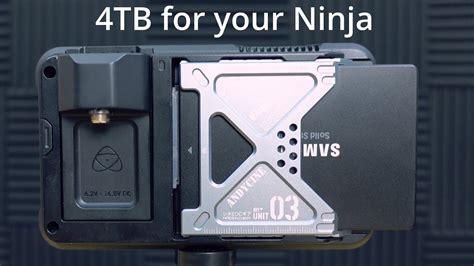
Widely available 2.5” SSDs are the basic storage media for ATOMOS Monitor Recorders. We work closely with leading drive manufacturers to qualify as many options as possible. Before using these drives, they need to be mounted in the Master Caddy II or Master Caddy III. All SSD drives mentioned in the search results are standard 2.5-inch size. Most drives mentioned in the search results are standard SATA SSD drives. Before use, insert them into our Master Caddy II, or III for a secure fit across all of our monitor recorders. There’s a wide variety of 2.5-inch SSD drives available.
To purchase Master Caddy II units, visit atomos.com/accessories/master-caddy-ii-5pack
AtomX SSDmini
Read also: Understanding April Zodiac Compatibility
ATOMOS has teamed with the world’s leading media manufacturers to design SSD media that is better suited to our ever evolving Monitor Recorders. The AtomX SSDmini is a little over 1/4 inch tall and 3” long. It is also 20% shorter than traditional SSDs, yet keeps the standard SATA III connector.
It fits directly into the NINJA V+ without the need for a Master Caddy II and is compatible with all ATOMOS recorders and docking stations. The AtomX SSDmini is designed to fit the form factor of the Ninja and Neon. AtomX SSDmini is backward compatible with previous ATOMOS devices by adding a clever extension handle (SSDmini adapter). These tiny, slimline SSDs are a true innovation by our close drive partners Nextorage and Angelbird.
When combined with the Angelbird AV PRO CF - CFast 2.0 memory card, you can capture RAW in high resolution and high frame rates. You can even utilize older CFast type 1 cards to upload and store 3D LUTs.
To purchase an AtomX CFast Adapter, visit atomos.com/accessories/atomx-cfast-adapter
Atomos Ninja V and Accessories 2020
Secure Erase
For drives that carry the ATOMOS Logo such as the G-Technology 4K SSD, Angelbird 4KRAW, AtomX SSDmini by Angelbird and Sony, an option for Secure Erase is presented. This allows for the entire drive including the drive cache to be formatted. This will erase ALL content on the drive meaning nothing can be recovered. It will wipe all data off the drive (which may also be useful as a additional security measure) and reset it back as close as possible to factory conditions. The benefit of this feature is that it helps to maintain maximum drive performance, and therefore should be used when available.
The Risks of Using Non-Approved SSDs
While it may be tempting to use non-approved SSDs to save money, doing so carries potential risks. Some users have reported success with certain non-approved drives, while others have experienced issues such as dropped frames or data corruption. The fact Atomos doesn't include their $30 HDMI cable is kinda a kick in the "nvts". So, I'm going to guess any SSD does actually work but you run the risk of losing footage by using a non-tested SSD by Atomos. I'm fine to gamble with personal footage but of course for a wedding or client it would be foolish, if you're a professional.
So, has anyone been using a non-approved SSD and if so what are you using? I have the approved WD Blue 1TB. I've seen no difference between that and the Crucial MX500 2TB or Samsung 860 1TB. The Sandisk Ultra 3D gave me the kangaroo warning, but I didn't really notice a dropped frame, the video was simply broken up into different files (different than the 4GB limit). I got dropped frames on all of them with 2 bad HDMI cables, including Atomos' own. I put some black tape on them to mark as only for use on my 7" monitor, not recorder.
User Experiences with SSDs
Many users have shared their experiences with different SSDs on the Atomos Ninja V:
- Some users have reported success with approved drives like the Sony Atom X 500GB & 2TB.
- Others have found that non-approved drives like the Crucial MX500 2TB and Samsung 860 1TB work without issues.
- However, some drives like the Sandisk Ultra 3D have triggered warnings, indicating potential compatibility problems.
Maintaining Optimal Drive Performance
To ensure the integrity of data writes and to avoid situations such as fragmentation, the ATOMOS operating system on the NINJA V+ does not support the deletion of files. We also do not advise removing or deleting files randomly from the disk on your computer. Often files are left in the trash or garbage partition of the drive occupying drive cache and this can affect drive performance. It’s advised that you archive your content and reformat the drive before each shoot.
Exascend and Nextorage SSDs do not require frequent formatting to maintain optimal sustained performance due to their advanced garbage collection algorithms.
Backing Up and Archiving Your Content
Remember that no storage media, including tape, optical disks, spinning disks and flash memory, is completely immune from failure. You should bear this in mind when deciding how to manage your recorded content. At the very least, you should consider the consequences for you and your business if your storage media were to suffer from a sudden failure, and you should back up your content accordingly.
Approved vs. Disapproved: Understanding the Nuances
Keep in mind that what's approved and disapproved depends on what you're doing with it... and as you can see it depends on what speed, bit-depth, etc you're using. This highlights the importance of considering your specific recording needs when selecting an SSD.
Cost vs. Reliability
While the AtomX drives may be perceived as overpriced, they offer a lower risk of problems and incompatibilities due to the close working relationship between Atomos and the drive manufacturers. Being a PC builder for 15+ years, it's common knowledge there is an abundance of quality 1tb ssds for $100. Keep in mind that EVERYTHING video related is more expensive than stills.
Table of Compatible SSDs
Below is a table summarizing some of the user experiences with different SSDs, as mentioned in the search results:
| SSD Model | Type | User Experience |
|---|---|---|
| WD Blue 1TB | Approved | No difference compared to other drives |
| Crucial MX500 2TB | Non-Approved | Works without issues |
| Samsung 860 1TB | Non-Approved | Works without issues |
| Sandisk Ultra 3D | Non-Approved | "Kangaroo warning", video broken into different files |
| Sony Atom X 500GB/2TB | Approved | Works reliably |
Conclusion
Choosing the right SSD for your Atomos Ninja V involves balancing cost, reliability, and compatibility. While approved drives like the AtomX SSDmini offer the best guarantee of performance, some users have found success with non-approved drives. By considering your specific recording needs and backing up your content, you can minimize the risks and maximize the benefits of external recording with your Atomos Ninja V.
tags: #atomos #ninja #ssd #compatibility