The iPhone 15 marked a significant change that is capturing the attention of tech enthusiasts and everyday users alike: the shift from Apple's proprietary Lightning connector to the more universally adopted USB-C. This move, though welcomed by many, has left some users questioning the compatibility of their old accessories, particularly chargers. So, can you use your old iPhone charger with the new iPhone 15?
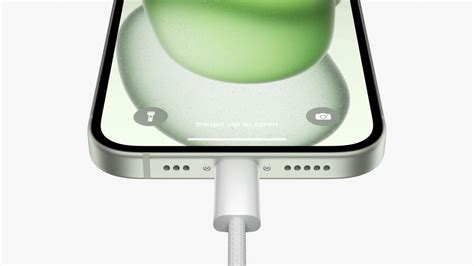
The Transition from Lightning to USB-C
The Lightning connector has been a staple in Apple products since its introduction in 2012 with the iPhone 5. It offered a sleek, reversible design that was ahead of its time. However, as technology evolved, the demand for a more versatile and faster standard grew.
USB-C is a universal standard that offers several advantages over Lightning. It supports faster data transfer rates, higher power delivery for quicker charging, and the ability to connect to a wider array of devices and accessories. The transition to USB-C marks a significant step forward in creating a more unified and efficient tech ecosystem.
Can You Use Your Old iPhone Charger?
Yes, you can use your old iPhone charger with the iPhone 15 using an adapter.
Here are a couple of options:
Read also: Choosing the Right Fitness Watch for Your iPhone
- If your old iPhone used a USB-A power adapter (the larger, rectangular port), all you need to do is upgrade to a USB-C to USB-A cable. These cables have a USB-C connector on one end to plug into your iPhone 15 and a USB-A connector on the other end to fit into your old charger.
- Another option is to use a Lightning to USB-C adapter. This small accessory allows you to connect your old Lightning cables to the USB-C port on your iPhone 15.
While you can use your old iPhone charger with the new iPhone 15 using adapters or specific cables, upgrading to a USB-C charger is advisable for the best performance and convenience.
Understanding USB-C Compatibility and Charging
You can charge your iPhone with a USB-C cable and a power adapter that complies with the USB-C standard. This includes USB Power Delivery, like the cable that comes with your iPhone. If you have another device with a USB-C connector, connect the device to your iPhone with a USB-C cable, such as the one included with your iPhone. To charge a device that has a Lightning connector, connect the device to your iPhone using an Apple USB-C to Lightning cable. Charge your Apple Watch by connecting an Apple Watch Magnetic Fast Charger to USB-C Cable directly to your iPhone.
To transfer data, like your photos and videos, you can connect your iPhone to your iPad, Mac, and other computers. Use a USB-C cable compliant with the USB-C standard, such as the cable that comes with your iPhone. These cables are available from Apple and other manufacturers. Just connect one end of the included USB-C charge cable to the USB-C connector on your iPhone and the other to a USB-C port on your computer.
Devices and cables that aren't compliant with the USB-C standard might not work as expected. In some situations, USB-C accessories and cables, such as those from third parties, can interfere with wireless connections. If you experience slower Wi-Fi or cellular performance while using a USB-C accessory, performance should return to normal after the accessory is disconnected.
The USB-C cable that comes with your iPhone supports charging and USB 2 speeds. If you want to use a USB 3 device, use a compliant USB 3 cable that supports 10Gbit/s. The Thunderbolt 4 (USB‑C) Pro Cable (1 m) has a Thunderbolt symbol to distinguish it from a USB-C cable.
Read also: Troubleshooting Bose Earbuds with iPhone
Recommended Charger Wattage
Standard/recommended is an Apple 20W charger, or a 3rd party charger supporting USB PD (USB Power Delivery), bearing in mind that the charger doesn’t “push” power; it just supplies the power “drawn” by the device. You need USB-C (for the correct connection type) so any Apple charging adaptor with a maximum output rating 20W or higher will be good for either a wired connection or MagSafe. Note the power rating is simply the maximum an adaptor can provide. Your iPhone is smart and will only take as much as it needs even if it is only a few % of the charger's rating, you should not need to worry about fast or slow charging.
From this support document from Apple, Fast charge your iPhone - Apple Support You need a 20W or higher power adapter to fast charge your iPhone 12 and later. Anything less will not fast charge the phone. The battery will only take what power it needs. That is one of the great things about how the charger in the phones and other Apple products work.
If you generally charge your iPhone overnight to get the advantage of having a fully charged phone in the morning and letting it backup automatically to iCloud, you can use one of the lower wattage power adapters. And if you have optimized charging turned on, it will learn your charge pattern, then charge to 80%, then slow down to finish to 100% just before you would normally be disconnecting it.
So if I read that correctly, no matter what charger you’re using, what cube, if it’s 20 all the way up to the 100 it will charge at the same speed, correct?
If you’re REALLY interested, there’s a decent USB-C VA Meter available for abt $25 which can be used to settle arguments. It’s the size and shape of a “normal” USB thumb-drive and has a built-in display screen. If you’ve got a “tech mindset” it’s also interesting to watch how the USB-PD negotiates voltage and current for different devices AND how the battery acceptance rate falls-off as the SoC increases.
Read also: iPhone XR and iOS Updates
Key Benefits of Upgrading to USB-C Chargers:
- USB-C power delivery (PD) technology enables significantly faster charging compared to older USB-A adapters.
- With USB-C becoming the standard across various devices, from laptops to headphones, investing in USB-C chargers and cables simplifies your charging setup.
- Modern USB-C chargers often come with additional features such as multi-port charging, which allows you to charge several devices simultaneously.
Quick Facts about iPhone 15 Charging:
- The iPhone 15 comes with a USB-C to USB-C cable, but the charger itself is not included in the box.
- The iPhone 15 does not have a Lightning port.
- The iPhone 15 supports wireless charging.
- If your current charger has a USB-C connector, it is compatible with the iPhone 15.
Troubleshooting Charging Issues
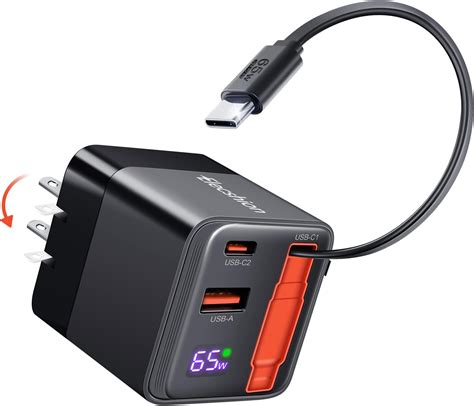
Some users have reported issues charging their iPhone 15 with chargers from Android phones (Huawei, Xiaomi, Realme, Meizu, iQOO). Testing has shown that Huawei 66W USB-C chargers work well, while some USB-A chargers may require a third-party cable to function correctly.
If you encounter issues, check the specs of your Android phone chargers to see if they support PD protocol. If you want to use a USB-A charger, the charging speed will be very slow or it'll stop charging.
In a nutshell, if your charger and cable are from reputable manufacturers and genuinely support the PD protocol, it should work fine with the iPhone 15 series.
iPhone 15 vs iPhone 14 Charging Speed Test (Does USB-C Matter?)
Related Articles:
- How Fast Apple iPhone 15 Pro Is Charged? - ChargerLAB Compatibility 100
- Charging Review of iPhone 15 Pro Max
- How Fast It Can Be?
| Charger Type | Compatibility with iPhone 15 | Notes |
|---|---|---|
| USB-C PD Charger (20W or higher) | Fully Compatible | Recommended for fast charging |
| Old iPhone USB-A Charger | Compatible with USB-C to USB-A cable | Slower charging speed |
| Android Phone Charger with USB-C PD | Generally Compatible | Ensure charger supports USB Power Delivery (PD) |
| Lightning Charger with Adapter | Compatible with Lightning to USB-C adapter | May not provide optimal charging speed |
tags: #iphone #15 #charger #compatibility