Magnetic Resonance Imaging (MRI) is a crucial diagnostic tool, but for patients with implanted devices like pacemakers or implantable cardioverter-defibrillators (ICDs), it can present challenges. About one-third of these patients face cancellations and delays when seeking MRI scans. This is often due to the complex process of confirming the device's MRI compatibility and coordinating with cardiology to set the device to 'safe mode' during the exam, increasing workload and expenses.
To address these issues, Medtronic has launched the MRI Care Pathway, a new system designed to streamline the MRI process for patients with Medtronic MRI-compatible cardiac devices.
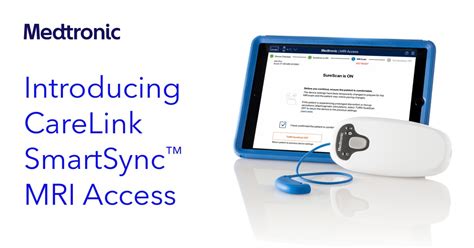
How the MRI Care Pathway Works
The system offers several key features:
- Quick Verification: Clinicians can rapidly verify whether a patient’s cardiac device is MRI-compatible.
- Automated Parameter Setting: MR technologists can automatically set the appropriate cardiac device parameters before and after the scan.
- Intuitive Interface: The process uses an intuitive tablet interface.
- Built-in Safety Features: The system includes safety alerts for MR technologists if an MRI scan cannot be safely performed.
If the patient’s Medtronic device is compatible, the care team can immediately schedule the MRI appointment. At the appointment, the MR technologist can use the app to automatically set the appropriate device parameters for a safe MRI scan. Following the scan, the MR technologist can use the app to return the patient to their cardiac device’s pre-scan settings.
The Impact on Patients and Clinicians
Research indicates that 50-70% of all patients with a pacemaker or ICD will require an MRI during their lifetime.
Read also: 1151 to 1200 Cooler Adapters
According to Peter Robertson, MD, an electrophysiologist at Ascension Saint Thomas Heart in Murfreesboro, Tennessee, “While this technology has offered a huge improvement to my clinical workflow, its impact on my patients' experiences when getting an MRI has been more important. It allows rapid assurance at the time of the MRI that the scan can be completed safely. The patients can be confident they’re getting the right care, at the right time, and at an imaging center prepared to provide correct care for their device."
MRI safety of devices and implants
MRI Considerations for Neurostimulation Systems
When you have an implanted neurostimulation system, it's important to take precautions during MRI scans. Here's what you need to know:
- Consult Your Specialist: Contact your pain specialist to discuss your upcoming MRI scan.
- Provide Device Information: When you schedule your MRI appointment, give the office staff the model number of your implanted neurostimulation system and contact information for your pain specialist.
- Recharge Your Device: Be sure to recharge your neurostimulator before your MRI appointment (if needed) to avoid delays.
- Bring Your Programmer: Bring your patient programmer/handset with you in case it is needed.
- Check MRI Eligibility: Check your MRI eligibility using your therapy programmer or controller by accessing MRI mode.
- Enter MRI Mode: Before you enter the room with the MRI scanner, put your neurostimulation system in MRI mode. This turns off the stimulation. You will see "In MRI mode" on your therapy programmer screen. To activate MRI mode, refer to the user guide for your device.
Important Note: The implanted neurostimulation system allows the patient to be eligible to have MRI scans of any part of the body under specific conditions. The implanted neurostimulation system allows the patient to be eligible for MRI scans of the head only using an RF transmit/receive head coil and under other specific conditions.
Identification Card
Present your ID card when you have any medical or dental procedures, or when you need to go through a security screening system at an airport or elsewhere. You should receive a temporary ID card when your neurostimulator is implanted. Three to four weeks later, you will automatically receive a permanent ID card from Medtronic. If your ID card is lost or stolen, Patient Registration can issue a replacement card.
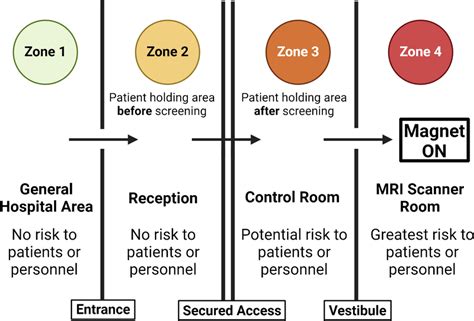
For any further questions, consult with your doctor and refer to product labeling for a full list of conditions.
Read also: Sagittarius Relationships
Read also: Understanding April Zodiac Compatibility
tags: #medtronic #mri #compatibility #checker