The Hardware Compatibility List, more popularly known as VMware HCL within VMware, is a single point of reference for you to ensure that any hardware which you are planning to use with your VMware software has been tested and certified to work fine. The HCL is a very famous and popular tool amongst those who are a part of VMware community.
This document tells you how to use this tool effectively and quickly to find out any information which you need about hardware compatibility. Once you are the Hardware Compatibility Search screen, you have 2 options from hereon, either you can use the Standard Search of click on a hyperlink which takes you to the Guided Search.
Using the VMware Hardware Compatibility List
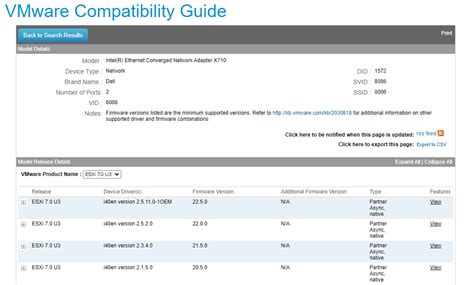
Using the VMware HCL
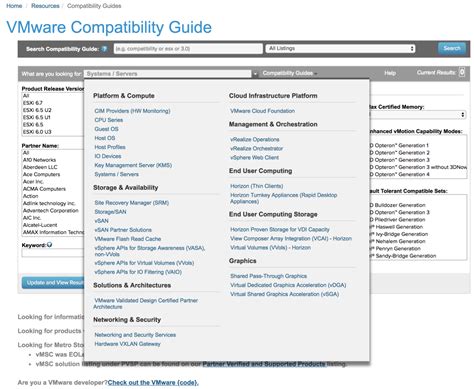
The most important drop-down here is to select the type of Hardware for which you are seeking compatibility:
- Systems / Servers - As the name suggests, helps you find the compatible servers with all the releases of ESXi hypervisor. These servers can be Rack Mounter, Blade, Tower or from any Vendor such as HP, Dell, Cisco, IBM etc. There are multiple options under this search type for you to narrow down your search to your choice of server hardware.
- Storage/SAN - Another important search criteria which helps you select the storage model and make and find compatibility for the same against a ESXi platform of your choice.
- VMware View - This option explore all the hardware possibilities for End user computing product line of VMware.
For guided search you just need to click on link shown in the screenshots above. This will launch a simple wizard with a few easy to follow steps. You have to go through the options and select what you are looking for.
Important Compatibility Notes
Here are some important compatibility considerations for specific hardware configurations:
Read also: Hardware Compatibility for vSphere 8
- vSAN customers are recommended to use ESXi 7.0 Update 3j.
- For platforms using 4th Gen Intel® Xeon® Scalable processors with Intel® vRAN Boost - ESXi support starts at ESXi 8.0 U1.
- For 1 or 2-socket platforms using 5th Generation Intel® Xeon® Scalable Processors with XCC (34 cores ≥≤64 cores) or MCC (16 cores ≥≤32 cores) CPUs - ESXi 7.0U3 support starts at ESXi 7.0 Update 3o and ESXi 8.0 support starts at ESXi 8.0 U1.
- For 2-socket platforms using 4th Generation Intel® Xeon® Scalable Processors and using 5th Generation Intel® Xeon® Scalable Processors with EE LCC (≤12 cores) CPUs - ESXi 7.0U3 support starts at ESXi 7.0 Update 3i and ESXi 8.0 support starts at ESXi 8.0a.
- For 2-socket platforms using Intel® Xeon® CPU Max 9400 Series processors with high-bandwidth memory (HBM), ESXi 8.0 support starts at ESXi 8.0 U3.
- For 1 or 2-socket server platforms using Intel® Xeon® 6500P/6700P Series Processors - ESXi 8.0U3 support starts at ESXi 8.0 Update 3e.
- Intel® Xeon® 6700E Series Processors are not currently supported by VMware at this time.
Example Compatibility Data
The following table provides a summary of ESXi support for different server models and versions:
| Server Model | ESXi 7.0 U3 | ESXi 8.0 | ESXi 8.0 U1 | ESXi 8.0 U2 | ESXi 8.0 U3 | ESXi 9.0 |
|---|---|---|---|---|---|---|
| DL320 Gen12 | 8.0 U3 | 9.0 | ||||
| DL360 Gen12 | 8.0 U3 | 9.0 | ||||
| DL380 Gen11 | 7.0 U3 | 8.0 | 8.0 U1 | 8.0 U2 | 8.0 U3 | 9.0 |
| DL380a Gen11 | 7.0 U3 | 8.0 | 8.0 U1 | 8.0 U2 | 8.0 U3 | 9.0 |
| DL380 Gen12 | 8.0 U3 | 9.0 | ||||
| DL380a Gen12 | 8.0 U3 | 9.0 | ||||
| Services Engine | 8.0 | 8.0 U1 | 8.0 U2 | 8.0 U3 |
I will leave you with other important links which you can use to take Compatibility and Interoperability decisions for your VMware environment and ensure that you always are in compliance by using the compatible and tested hardware.
Read also: 1151 to 1200 Cooler Adapters
Read also: Sagittarius Relationships
tags: #vmware #compatibility #list