If you're looking to upgrade your home or office computer's display, a monitor is one of the most important parts of the equation. It's the screen that displays all of your work and play, so it's worth investing in one that's powerful enough, sharp enough, and has the right connections for your needs.
The compact Mac mini fits just about anywhere and brings along the beloved Apple ecosystem, though it does need a monitor unlike its MacBook Pro sibling. Whether your Mac mini acts as a primary device or a secondary work platform, you need a monitor that helps you get the most from every situation.
Certainly, you can use an Apple Mac Mini with a monitor from another brand, such as LG. Switching to a Mac Mini with an external monitor can provide you with more flexibility in your setup and could be more cost-effective than purchasing a new iMac, especially if you already have a monitor, keyboard, and mouse. Alternatively, if you're considering a laptop, a MacBook Pro with a 15 or 16-inch display can be a good choice. They are powerful machines and offer the added benefit of portability.
Here's a guide to help you choose the best monitor for your Mac Mini, considering factors like resolution, color accuracy, connectivity, and ergonomics.
Key Considerations for Mac Mini Monitors
Main considerations are to make sure that:
Read also: Interpreting Blood Dreams
- The monitor has compatible ports or that you have the necessary adaptors or cables.
- The monitor supports the resolution and other features you may need for your workflow.
When choosing a monitor for the Mac mini, prioritize 4K or 5K resolution for sharp macOS scaling and choose a pixel density that matches Retina clarity. Look for wide color gamut coverage such as DCI-P3 and accurate color calibration for consistent results across Apple devices.
Connectivity is also key, since the Mac mini has limited ports, so a monitor with Thunderbolt 4 or USB-C and built-in docking adds useful USB-A, HDMI, or DisplayPort options. Ergonomics like anti-glare coating and height or tilt adjustments help with long work sessions.
The best monitors for Mac mini (M1 / M2 / M2 / M4 / M4 Pro) deliver wide color gamut, high pixel density, and the Mac-friendly consistency professionals expect. Let’s take a closer look at what makes a good external display for Mac mini.
Connectivity
The Mac mini’s minimalist design also means limited ports. Port configurations vary by model. Depending on the version, you may get multiple Thunderbolt ports (Thunderbolt 4 on M1, M2, and M4 models, and Thunderbolt 5 on M4 Pro), USB-C-based connectivity, HDMI 2.1, and Ethernet, with newer M4-based models no longer including USB-A ports.
A monitor with extra ports solves this problem. A Thunderbolt 4 or USB-C display can act as a hub and add more connectivity for storage devices, calibration tools, cameras, or peripherals. Monitors with built-in docking are a major upgrade for Mac mini users who need more reliable wired connections. These displays add extra Thunderbolt or USB-C ports along with useful USB-A ports, which reduces the need for adapters.
Read also: Decoding Common Dreams
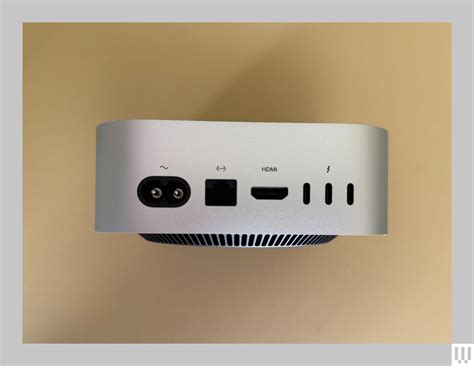
Image Clarity and Resolution
When choosing a monitor for your Mac mini, image clarity matters just as much as resolution. macOS relies heavily on pixel density, or PPI, to render text and interface elements cleanly. A 24-inch 4K monitor sits around 184 PPI and comes very close to Retina sharpness. A 27-inch 4K display drops to about 163 PPI, which is still crisp but not quite at Apple’s native clarity. For the best possible experience, a 27-inch 5K display at 218 PPI like the ViewSonic VP2788-5K offers the same level of sharpness Apple targets in its own monitors.
Color Accuracy
The DCI-P3 color space has become standard on Mac. It’s about 25% larger in terms of color coverage than standard RGB, or sRGB, which is more commonplace on Windows. Mac mini monitors offer nearly complete DCI-P3 coverage. For example, the ViewSonic VP2788-5K has 99% DCI-P3, shown on a premium IPS panel with an anti-glare coating.
Ergonomics and Design
Monitors compatible with Mac mini (M1 / M2 / M2 Pro / M4 / M4 Pro) offer a design that supports extended work sessions in different locations. It starts with an anti-glare screen that prevents reflections, which if left unaddressed very quickly distract and detract from your productivity. For optimal ergonomic bliss, swivel, tilt, pivot, and height adjustment to get a monitor that adapts to your needs. Not only that, but a monitor that also adapts to your locale. Different desks and different lighting conditions?
Many Mac-compatible monitors come factory-calibrated to deliver accurate color right out of the box. This means the display is already tuned for macOS-friendly color profiles, brightness, and contrast. Premium models also include hardware calibration tools.

Multi-Monitor Setups and Daisy Chaining
You may eventually find yourself needing a Mac mini dual monitor setup, and at that point you might be wondering how to display multiple monitors on Mini Mac in a way that works smoothly with your workflow. Perhaps you do graphic design on the first monitor connected to your Mac mini while using a second display for visual references, inspiration, or a 100% scale final output preview. Software engineers or app developers may use the primary monitor for coding and debugging, with a second monitor in vertical orientation to read long files, API documentation, or view full stack traces and console logs without scrolling.
Read also: Understanding Mercy as a Gift
Naturally, a good Mac mini monitor offers full support for daisy chaining. In Mac terms, that’s done via Thunderbolt/USB-C. But since really good mac monitors also have native DisplayPort, you have more flexibility. The best Mac mini monitors maintain steadfast scaling and layout consistency. No goofy text or window sizes and non-standard desktop configurations.
Top Monitor Recommendations
Here are some of the best monitors for Mac Mini, categorized by use case and budget:
Best Monitor for Mac Mini Overall: BenQ MA320U
The BenQ MA320U is a crisp 3840x2160, 32-inch display that plays beautifully with macOS thanks to DisplayPilot 2. The expansive display makes your Mac mini feel massive, making multitasking, research, or photo editing a breeze.
Specifications:
- Screen Size: 32in
- Resolution: 4K UHD (3840 x 2160) / 140 PPI
- Color coverage: 97% P3 / 99% sRGB
- Refresh rate: 60Hz
- Panel: IPS (Nano Matte)
- Ports: 2x USB-C (90W PD), 2x USB-A, 2x HDMI 2.0, 1x audio jack
Pros:
- Fantastic color accuracy
- Mac integration with Display Pilot 2 (brightness and volume)
- 90W USB-C Power Delivery
Cons:
- Mediocre built-in speakers
- HDR Performance caps at 600 nits
- No Thunderbolt 4
Best Mac Mini Monitor on a Budget: BenQ EW2790U
If you want a display that bounces between work and play for your dedicated home setup, this monitor does precisely that, flawlessly.
Specifications:
- Screen Size: 27in
- Resolution: 4K UHD (3840 x 2160) / 163 PPI
- Color coverage: 95% P3
- Refresh rate: 60Hz
- Panel: IPS
- Ports: 2x USB-C (65W PD), 3x USB-A, 3x HDMI 2.0, 1x audio jack
Pros:
- 4K UHD Resolution
- 95% DCI-P3 color coverage
- Better-than-average speakers
- Great ports
Cons:
- Only 60Hz
- No DisplayPort
- USB-C PD is limited to 65W
Best Monitor for Mac Mini for Business: Dell UltraSharp U2723QE
This is a strong contender for best Mac mini monitor overall - and it's only edged out by the BenQ model thanks to that display's integration with macOS. In almost every other regard, we found this a superb 27in 4K display. And if you're hooking up a lot of peripherals and accessories, it's perfect thanks to the inclusion of its USB-C hub.
Specifications:
- Screen Size: 27in
- Resolution: 4K UHD (3840 x 2160) / 163 PPI
- Color coverage: 98% P3 / 100% sRGB
- Refresh rate: 60Hz
- Panel: IPS Black
- Ports: 3x USB-C (90W PD), 4x USB-A, 1x DisplayPort 1.4, 1x DisplayPort Out, 1x HDMI 2.0, 1x RJ45 Ethernet
Pros:
- Built-in connectivity hub with plenty of USB ports
- Good color spaces for sRGB, Rec. 709, DCI-P3
- High image quality, Low Blue Light setting and anti-glare finish
Cons:
- High Resolution or High Data Speed option
- Provided USB-C cable is too short
- Display panel had a faint shadow along edges of screen.
Best Mac Mini Monitor for Creators: BenQ PD3226G
While there are a lot of Mac mini monitors that are well-specced for creative professionals, the BenQ PD3226G stood out in our tests thanks to a broad, well-calibrated color coverage across DCI-P3 and sRGB. As with many BenQ monitors, it also features a M-Book mode, which matches the factory calibration of Apple devices.
Specifications:
- Screen size: 32in
- Resolution: 4K UHD (3840 x 2160) / 140 PPI
- Color coverage: 95% P3 / 100% sRGB
- Refresh rate: 144Hz
- Panel: IPS
- Ports: 2x Thunderbolt 4 (90W PD), 1x USB-C, 3x USB-A, 1x HDMI 2.1, 1x DisplayPort 1.4
Pros:
- Gorgeous 4K IPS panel
- Fantastic connectivity
- 144Hz refresh
Cons:
- Price
- Limited HDR support
- Terrible built-in speakers
Best 5K Monitor for Mac Mini: Apple Studio Display
This is an excellent all-in-one solution for the Mac mini, since the Apple Studio Display boasts a built-in webcam, speakers, and microphone. And, since it's from Apple, it's fully compatible with the Mac mini's features.
Specifications:
- Screen Size: 27in
- Resolution: 5K (5120 x 2880) / 218 PPI
- Color coverage: P3 Wide Color
- Refresh rate: 60Hz
- Panel: IPS
- Ports: 1x Thunderbolt 3 (96W Charging), 3x USB-C
Pros:
- Bright and vivid colors
- Great speakers
- Nice design
- Good webcam
Cons:
- No HDR
- Lacks ports
- Some features are Mac-exclusive
- Better value monitors out there
Best 6K Monitor for Mac Mini: Dell U3224KB UltraSharp
Dell knocked it out of the park with their highly featured 6K monitor, and it tops the list of our top-rated monitors for photo editing for good reason. The company has managed to delicately perch this beautiful display right between Apple's Studio Display and the Pro Display XDR.
Specifications:
- Screen Size: 32in
- Resolution: 6K (6144 x 3456) / 223 PPI
- Color coverage: 99% P3
- Refresh rate: 60Hz
- Panel: IPS Black
- Ports: 1x Thunderbolt 4 (140W PD), 2x USB-C, 4x USB-A, 1x Mini DisplayPort 2.1, 1x HDMI 2.1, 1x RJ45 Ethernet
Pros:
- Beautiful 6K display
- Integrated 4K HDR webcam
- Thunderbolt 4 connection
- Great collection of connectivity ports
Cons:
- Same stands with low cable passthrough
- Mic sound is slightly tinny
Here's a quick comparison table of the recommended monitors:
| Monitor | Screen Size | Resolution | Color Coverage | Refresh Rate | Ports | Best For |
|---|---|---|---|---|---|---|
| BenQ MA320U | 32in | 4K UHD | 97% P3 / 99% sRGB | 60Hz | 2x USB-C, 2x USB-A, 2x HDMI 2.0 | Overall Use |
| BenQ EW2790U | 27in | 4K UHD | 95% P3 | 60Hz | 2x USB-C, 3x USB-A, 3x HDMI 2.0 | Budget |
| Dell UltraSharp U2723QE | 27in | 4K UHD | 98% P3 / 100% sRGB | 60Hz | 3x USB-C, 4x USB-A, DP 1.4, HDMI 2.0 | Business |
| BenQ PD3226G | 32in | 4K UHD | 95% P3 / 100% sRGB | 144Hz | 2x Thunderbolt 4, USB-C, USB-A, HDMI 2.1, DP 1.4 | Creators |
| Apple Studio Display | 27in | 5K | P3 Wide Color | 60Hz | Thunderbolt 3, 3x USB-C | Apple Ecosystem |
| Dell U3224KB UltraSharp | 32in | 6K | 99% P3 | 60Hz | Thunderbolt 4, USB-C, USB-A, Mini DP 2.1, HDMI 2.1, RJ45 | High-End Use |
Additional Considerations
Can I use an ultrawide monitor with a Mac mini?
Yes. Mac mini supports:
- 3440 x 1440
- 3840 x 1600
- 5120 x 1440
Use USB-C to DisplayPort for best results.
What cables or adapters should I use?
Best options:
- USB-C to USB-C (for monitors with USB-C input)
- USB-C to DisplayPort (most reliable for 4K/144Hz)
- HDMI to HDMI 2.0/2.1 (for 60Hz or 120Hz setups)
Avoid:
- VGA or DVI adapters
- Cheap unbranded adapters
Portable Monitors
In meetings, in the classroom and anywhere in between, Acer’s PM Series portable monitor is the go-to choice for people on the move! Just fire it up and enjoy High-Definition entertainment-anywhere! Its accurate, vivid colors come to life from any viewing angle on the 16.0” IPS display that features WUXGA (1920x1200) resolution and 16:10 aspect ratio. Its slim design (0.52") and ultra-light weight (1.43 lbs.) allows it to easily fit in your laptop bag! Perfect for use as a secondary monitor for dual-monitor presentations, it’s powered by a single USB Type C cable, giving you the freedom to connect it to your laptop, smartphone or tablet-quickly and easily! Get fast refresh rates thanks to the Adaptive-Sync Support product that matches the refresh rate of your monitor with your graphics card.
The ViewSonic ColorPro VP16-OLED is a 15.6" portable monitor with native Full HD 1080p resolution and advanced OLED technology for incredible visual performance on the go. The VP16-OLED is Pantone Validated and factory calibrated to deliver richer color uniformity and enhanced details, ensuring that it meets the demands of professional content creators. A flexible and foldable ergonomic stand delivers easy height adjustment for the perfect viewing angle in a variety of environments.
In meetings, in the classroom and anywhere in between, Acer’s PM Series portable monitor is the go-to choice for people on the move! Just fire it up and enjoy High-Definition entertainment-anywhere! Its accurate, vivid colors come to life from any viewing angle on the 15.6” IPS display that features Full HD (1920x1080) resolution. Its slim design (0.4") and ultra-light weight (3.85 lbs.) allows it to easily fit in your laptop bag! Perfect for use as a secondary monitor for dual-monitor presentations, it’s powered by a single USB Type C cable, giving you the freedom to connect it to your laptop, smartphone or tablet-quickly and easily!
Cheap 5K vs Apple Studio Display in 2025! Best display for your Mac?
Gaming Monitors
In competitive gaming, every frame matters. Introducing Acer's XV275K gaming monitor - the UHD (3840 x 2160) resolution monitor delivering you a 576-zone miniLED local dimming panel and VESA DisplayHDR 1000. Add AMD FreeSync Premium to the mix and your gaming experience will be unbeatable! This AMD FreeSync Premium monitor takes gameplay to the next level of smooth, the game’s frame rate is determined by your graphics card, not the fixed refresh rate of the monitor, giving you a serious competitive edge.
Explore the 4K UHD Odyssey Neo G7 gaming monitor with 1ms response time (MPRT), Quantum Mini LED, and VESA Display HDR600. Experience a versatile screen for both games and streaming videos. With a size of 43", the G7 is the perfect entertainment screen that has an ideal design for both console and PC games