When setting up an enterprise network, choosing the right hardware is a foundational step. You'll often encounter terms like "fiber router" and "normal router," which can seem interchangeable at first glance. However, their core functions and ideal use cases are tied directly to the type of internet connection your business uses. This article will explain the key differences between them, helping you make an informed decision for your organization's specific needs.

What is a Fiber Router?
A fiber router is a networking device designed specifically to work with a fiber-optic internet connection. It acts as the central hub for distributing the high-speed internet that comes into your building via light signals traveling through fiber-optic cables. Its main function is to translate these light signals into the electrical signals that your computers, servers, and other networked devices can understand. This translation often occurs via a device called an Optical Network Terminal (ONT), which the fiber router then connects to.
Key characteristics of a fiber router include:
- It is engineered to handle the gigabit-level speeds that are standard with fiber internet.
- It connects directly to an ONT, or in some cases, has an ONT integrated into the unit itself.
- Like other routers, it manages local network traffic, assigns IP addresses, and provides Wi-Fi access.
- It incorporates essential security functions, such as a firewall, to protect your organization's network from external threats.
What is a Normal Router?
A normal router, also known as a standard or traditional router, is a device built for common internet service types like cable and DSL. It's the familiar hub of most office and home networks that do not use a fiber-optic connection. Its primary role is to take the internet connection from a modem and distribute it to various devices. The modem handles the initial signal conversion from the provider's infrastructure (e.g., coaxial or phone lines), and the router then creates and manages your local network.
Key characteristics of a normal router include:
- It is designed to handle the bandwidth provided by cable and DSL connections, which can range from basic speeds to several hundred Mbps.
- It requires a separate modem to connect to the internet service provider's network.
- Like any router, it directs traffic between your local devices and the wider internet, assigns local IP addresses, and creates a Wi-Fi network.
- It includes fundamental security protocols, such as a firewall, to safeguard the network from unauthorized access.
Key Differences Between Fiber Routers and Normal Routers
While both types of routers manage your local network, the main distinctions lie in how they connect to the internet and handle incoming data.
1. Connection Technology
The most significant difference is the hardware each router connects to. A fiber router is designed to interface with an Optical Network Terminal (ONT), which is the endpoint for your fiber-optic line. In contrast, a normal router connects to a modem. This modem is specific to the type of service you have, such as cable or DSL, and acts as the bridge to that network.
Read also: Detailed Review of Arccos Golf
2. Signal Conversion Process
The two setups handle incoming signals differently. In a fiber system, the ONT does the critical work of converting light signals from the fiber cable into electrical Ethernet signals that your network can use. With a traditional setup, the modem is responsible for this conversion. It translates the signals from a coaxial or phone line into data that the normal router can then distribute to your devices.
3. Physical Hardware Setup
The physical arrangement of devices often varies. Internet Service Providers frequently supply an all-in-one unit for fiber connections that combines the ONT and router into a single box. For cable or DSL, the modem and router are typically separate devices. This modular approach can offer more flexibility in choosing or upgrading your router independently of the modem.
Performance and Speed Considerations
When it comes to performance, the router must be able to keep up with the speed of your internet connection. A router that can't handle the bandwidth from your provider becomes a bottleneck, slowing down your entire network. Here’s how they compare in practice.
Speed and Bandwidth Handling
A fiber router is built to manage the symmetrical, multi-gigabit speeds that fiber-optic connections deliver. This means it can handle equally fast upload and download traffic without performance loss. A normal router is designed for the asymmetrical nature of cable or DSL, where download speeds are typically much higher than upload speeds.
Data Throughput
Because they are paired with higher-speed connections, fiber routers generally have more powerful processors and more RAM. This allows them to manage a greater volume of data traffic from many devices at once, which is essential for a busy enterprise environment.
Read also: Apps for Oura Ring Users
Latency
The combination of a fiber connection, an ONT, and a fiber router is engineered for extremely low latency. This is critical for real-time applications like video conferencing and VoIP. While a normal router can be part of a low-latency setup, the underlying cable or DSL technology it connects to inherently has higher latency than fiber.
Wi-Fi Standards
To avoid creating a wireless bottleneck, fiber routers are more consistently equipped with the latest Wi-Fi standards (like Wi-Fi 6 or 6E). This ensures that the high speed from the fiber line can be delivered effectively to wireless devices.
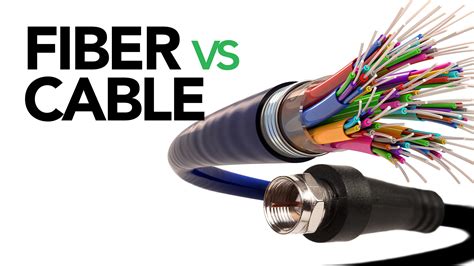
Cable vs Fiber Internet Explained
Cost Implications for Enterprises
From a budget perspective, the choice between a fiber and a normal router involves more than just the price of the box. The total cost is closely tied to the internet service itself and how the hardware is acquired.
Upfront Hardware Cost
Fiber routers, particularly those with integrated ONTs, can have a higher initial price. However, internet service providers often bundle this hardware with the service contract, either as a lease or as part of the subscription fee, reducing the direct capital expense.
Flexibility and Choice
With traditional cable or DSL, businesses typically purchase a normal router separately. This offers more flexibility to choose a device that fits a specific budget, but it means managing another piece of hardware procurement.
Read also: What is S3-Compatible Storage?
Total Cost of Service
The primary cost driver is the internet service plan. Fiber optic plans generally have a higher monthly fee than cable or DSL. The router's cost is a relatively small component of the total telecom spend over the life of the contract.
Long-Term Value
The cost of a fiber router reflects its advanced internal components, which are necessary to support gigabit speeds and lower latency. While a normal router is less expensive, its capabilities are matched to the lower-performance, lower-cost services it supports.
Installation and Maintenance
Getting your network hardware set up and keeping it running involves different levels of effort and expertise depending on the router type.
1. Fiber Router Setup
The installation of a fiber router and its connected ONT is almost always performed by a technician from your service provider. This is because it requires specialized handling of the delicate fiber-optic cable. Ongoing maintenance for the ONT and the connection itself is also typically the provider's responsibility, simplifying things for your IT team.
2. Normal Router Setup
In contrast, setting up a normal router is usually a straightforward task that your internal IT staff can handle. The process involves connecting the router to a pre-installed modem. This gives you more control over the setup, but it also means your team is responsible for router maintenance, including firmware updates and troubleshooting.
Making the Right Choice for Your Business
Ultimately, the decision between a fiber router and a normal router is determined by your underlying internet service. If your business requires the symmetrical gigabit speeds and minimal latency of a fiber-optic connection, then a fiber router is not just an option-it's a requirement. For organizations where standard cable or DSL services meet operational demands, a normal router is the correct and more economical hardware.
Therefore, the choice isn't about the router in isolation. It's about matching the hardware to your chosen internet infrastructure to prevent performance bottlenecks and ensure you get the service you pay for.
Fiber Optic Modems (FOM)
A fiber optic modem (FOM) acts as a connecting interface between an electronic device and an internet network. These modems are different than regular DSL modems because the signal transmission is not via copper cables. It uses a fiber optic cable network to transmit signals. It transforms electronic communication signals via a fiber-optic network.
Fiber optic modems (FOM) are used in several applications such as data communication network systems, inter-network communication systems, etc. Since these fiber optic modems are gaining popularity, it is important to have information about before using it blindly.
Working Principle of Fiber Optic Modems
The working of a fiber optic modem is quite simple. This transmission is a full-duplex transmission. The working principle of fiber optic modems revolves around the transmission of data using light signals through fiber optic cables. This working principle forms the foundation of fiber optic communication systems and enables the seamless transfer of data in various applications, from telecommunications networks to data centers and beyond.
- Data Transmission: The fiber optic modem receives electrical signals from the connected network device, such as a computer or router.
- Signal Conversion: The modem converts the electrical signals into optical signals using a transmitter. The transmitter contains a light source, usually a laser or LED, which emits light pulses.
- Modulation: The optical signals are then modulated using different techniques, such as amplitude modulation or frequency modulation.
- Fiber Optic Cable Transmission: The modulated optical signals are sent through the fiber optic cable, which is made of a core and a cladding layer.
- Signal Reception: At the receiving end, another fiber optic modem or device receives the modulated optical signals.
- Signal Processing: The electrical signals are then processed and decoded by the modem to retrieve the original digital data.
- Data Communication: The retrieved data is sent to the connected network device, such as a computer or router, for processing or onward transmission.
Types of Fiber Optic Modems
There are different categories of fiber optic modems according to the data transmission protocol followed by the modem:
- E1 FOM: The E1 FOMs are the modems that act according to E1 data transmission standards. These modems can be used for single or multiple fiber optics data transmission channels. These modems are suitable for multichannel, simultaneous, time-division multiplexing. The most appreciated use of E1 FOMs is international telecommunication.
- V35 FOM: V35 FOM is utilized for single or multimode transformation and transmission of electrical-optical-electrical signals. This V35 modem acts as electrical to optical data converter and vice versa at the end of the fiber optic cable.
- RS FOM: RS stands for recommended standards. The modems that act under recommended standards are called RS modems. These RS standards are established by The Electronics Industry Association.
- RS232: RS232 modem is the most basic fiber optics modem. It is a single-mode modem, therefore only one receiver and one transmitter can be connected.
- RS422: RS422 FOMs are designed for faster data transmission rates and longer transmission distance.
- RS485: RS485 FOM is designed for multimode data transmission. For multichannel fiber optic transmission, these RS485 fiber optic modems are used.
Benefits of Fiber Optic Modems
FOMs are gaining popularity over DSL modems and cable transmission due to their beneficial features. Due to uninterrupted data transmission, these modems can be used for long-distance telephone communication. Having Fiber optic as transmission media, the speed of transmission is higher than the general cabled network. You can use NDT or non-intrusive testing techniques such as BERT to check the communication link of these modems.
Installing and Maintaining Fiber Optic Modems
Installing and maintaining fiber optic modems require careful handling and adherence to best practices to ensure optimal performance and reliability:
- Connect Fiber Optic Cables: Use clean and properly prepared fiber optic cables with compatible connectors.
- Power Connection: Provide the necessary power supply to the modem according to the manufacturer's specifications.
- Cleaning Fiber Optic Connectors: Use specialized cleaning tools and lint-free wipes to clean the fiber optic connectors.
- Firmware Updates: Stay updated with the manufacturer's firmware updates for the modem.
- Performance Monitoring: Implement network monitoring tools to monitor the performance of the fiber optic modems.
- Documentation: Maintain accurate records of the installation details, maintenance activities, and any changes made to the fiber optic modems.
Fiber optic modems (FOM) can be used to expand networks across cities and states, and help you extend the distance by around 100km, without compromising on speed and signal strength. This is why they are useful in networks of mission critical applications such as defense and government.
Frequently Asked Questions about Fiber Router vs Normal Router
Can I use a normal router with a fiber internet connection?
Not directly. A normal router cannot connect to the Optical Network Terminal (ONT) required for fiber. While you can sometimes connect it to the ISP-provided fiber gateway, using the router designed for your fiber service ensures you get the full speed and performance you pay for.
Can I replace the fiber router from my internet provider?
This can be complex. Many providers use integrated ONT/router gateways or have specific firmware settings. Replacing the unit may be technically possible but could violate your service agreement and complicate troubleshooting. Always check with your provider before making changes to your hardware.
Is a fiber router inherently more secure than a normal router?
No. Security depends on the specific model's features, firewall, and configuration, not the connection type.
tags: #fiber #optic #compatible #router