Printers are essential tools in today's digital world. However, when your Brother printer displays a "low toner" message, finding the correct supplies quickly and accurately can be challenging. It's like searching for a specific ship in a vast ocean; without a reliable map, you can't reach your destination. This article will clarify toner compatibility, provide a detailed Brother toner compatibility chart, and assist you in making informed decisions.
A toner compatibility chart is more than just a list; it's a "health report" and "map" for your printer. Its primary function is to help you avoid issues caused by purchasing incorrect supplies. Imagine inserting the wrong toner into a printer. At best, the print quality will be poor, or the machine won't recognize it. At worst, it could damage internal components or shorten the printer's lifespan. This is akin to putting the wrong fuel into a high-performance car, which will undoubtedly harm its performance or cause it to break down. An accurate compatibility chart ensures that your toner is a perfect fit for your printer.
Additionally, there are numerous toner models available. Different printer series often require different toners and drums. For average users, manually searching and verifying can be time-consuming and prone to errors. A compatibility chart simplifies this process significantly.
Choosing the right toner involves more than just matching models. First, assess your print volume. If you print occasionally, a standard yield toner might suffice. However, for offices or businesses with high-volume printing needs, high, super high, or ultra-high yield toners will be more cost-effective. Next, consider print quality. Clear, sharp output is fundamental for both text and images. Finally, think about environmental factors. Reputable suppliers often have recycling programs or use eco-friendly materials.
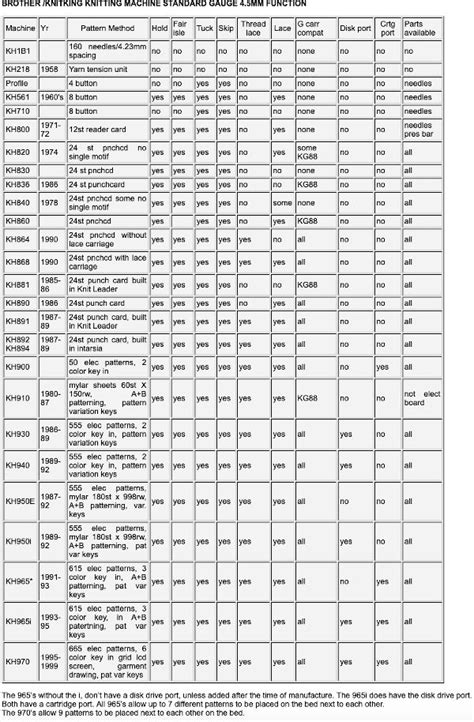
Original (Genuine/OEM) vs. Compatible Toner
Original toner (Genuine/OEM) is manufactured by Brother and offers reliable performance, typically providing the best print quality. This is often a crucial factor in maintaining your printer's warranty. Compatible toner, on the other hand, is produced by third-party companies and aims to deliver similar performance to original products at a lower cost. In the past, the quality of compatible toner was inconsistent.
Read also: TN229 Compatible Toner: Quality and Savings
Are OEM Toner Cartridges Better Than Remanufactured Ones?
Introducing Toner Master
Here, we present Toner Master, toner experts who understand the need for both affordability and high print quality. Toner Master's compatible drum products cost only about one-third of the price of original printer supplies, significantly reducing office printing costs. They prioritize quality by using carefully selected raw materials, from toner powder to drum components. Toner Master has decent R&D and knows compatibility. We remanufacture toners to suit the majority of the major printer brands, and a broad range of toners to suit Brother. We are also very quick in responding to new models of printers and we make sure that our products are updated. Their production process features an automated assembly line and high capacity, which minimizes human error and ensures consistent product quality.
Beyond products, Toner Master offers excellent service, including 24/7 support for all your needs, from pre-sales advice to custom solutions like free samples and personalized packaging. They stand behind their products with a satisfaction guarantee and offer a 3-year warranty, longer than most brands in the market. With a large inventory and wholesale prices, they support dealers and wholesalers.
Correctly Replacing Toner and Drum Units
Properly replacing toner and drum units is essential for maintaining your printer's performance. Here's a step-by-step guide:
- Prepare: Ensure the printer is powered on and ready.
- Open front cover: Gently open the front or top cover of the printer.
- Remove the old unit: Hold the handle of the drum unit and carefully pull it out of the printer. Avoid touching the drum's surface.
- Separate toner cartridge: Place the drum unit on a flat surface and press the release lever (usually green or blue) on the toner cartridge.
- Prepare new toner: Remove the new toner cartridge and gently shake it a few times to evenly distribute the toner.
- Install new toner: Insert the new toner cartridge into the drum unit, ensuring it clicks into place.
- Install back into printer: Put the assembled drum unit and new toner cartridge back into the printer.
- Close cover: Close the printer's front cover.
Troubleshooting Common Issues
Even with the correct toner and proper installation, issues can still arise:
- "Replace Toner" or "Toner Low" message persists: The printer might still display these messages even with new toner. This often occurs because the toner counter wasn't reset. Consult your printer manual for instructions on manually resetting the toner counter.
- Low toner: The toner might actually be low or not evenly distributed.
- Drum unit life ends: The drum unit has a limited lifespan and will eventually wear out. An old drum can result in poor print quality even with a full toner cartridge.
- Printer internal dirt: Dust or residual toner inside the printer or on the drum can cause issues.
- Printer does not recognize toner cartridge: Ensure the toner cartridge is fully inserted and check for any damage or poor contact.
Brother TN229 Series Toner Cartridges
Brother TN229 series toner cartridges are compatible with HL-L3220CDW, HL-L3280CDW, HL-L3295CDW, HL-L3300CDW, HL-L8245CDW, MFC-L3720CDW, MFC-L3765CDW, MFC-L3780CDW, and MFC-L8395CDW. These printers are currently the most popular Brother color laser printers and are known for their reliability, performance and longevity. Therefore, Brother TN229 series toner cartridges have become the choice of more and more printer users.
Read also: TN221 & TN225 Toner Cartridge Information
The main differences between Brother TN229, TN229XL and TN229XXL toner cartridges are page yield and printer compatibility.
- Brother TN229BK/C/M/Y: Standard-yield toner cartridges suitable for low-volume printing. (TN229BK: approx. 1,500 pages; TN229C/M/Y: approx.
- Brother TN229XLBK/C/M/Y: High-yield toner cartridges offering more pages per cartridge, ideal for moderate usage. (TN229XLBK: approx. 3,000 pages; TN229XLC/M/Y: approx.
- Brother TN229XXLBK/C/M/Y: Extra high-yield toner cartridges with the highest page yields, ideal for heavy-duty printing tasks and businesses with high-volume printing needs. (TN229XXLBK: approx. 4,500 pages; TN229XXLC/M/Y: approx.
It is worth noting that Brother TN229XXL toner cartridges are not compatible with all printer models using TN229 and TN229XL.
Brother DR229CL Drum Units
Unlike most HP and Canon printers, Brother printers have separate toner cartridges and drum units. Brother DR229CL drum units are designed to work with Brother TN229, TN229XL and TN229XXL toner cartridges. When a print job is initiated, the toner cartridges release toner powder onto the photosensitive drum. Then the drum units transfer the toner powder onto the paper. Transferring is a very important step in the printing process.
Drum units usually have a longer lifespan than toner cartridges. Brother DR229CL drum units are no exception, each drum unit can print over 20,000 pages. If you are using a Brother TN229 standard-yield toner cartridge, this means you can continue to use more than 10 toner cartridges without replacing the drum unit. This partly makes the printing cost of Brother printers lower than HP and Canon.
It is worth mentioning that each Brother DR229CL drum unit can be used with any color of TN229 toner cartridges.
Read also: Key Features of HP 83A Toner
Compatible TN229 Toner Cartridges
Compatible TN229 toner cartridges are supplies manufactured by third-party (non-OEM) factories. They are designed to replace genuine Brother TN229 toner cartridges at a fraction of the cost.
When comparing compatible TN229 and genuine Brother TN229 toner cartridges, there are several factors to consider, including cost, performance and warranty.
- Cost: Genuine Brother TN229 toner cartridges cost much more than compatible TN229 toner cartridges.
- Performance: Genuine Brother TN229 toner cartridges have the best compatibility, reliability and quality because they are made specifically for Brother printers. The compatibility, quality and reliability of compatible TN229 from different supplier may vary. Make sure to order compatible toner cartridges from a reputable supplier.
- Warranty: Different toner cartridge suppliers have different warranty policy. Most suppliers offer a 1-year product warranty. While Ready Toner offers a LIFETIME GUARANTEE because we are confident in our product quality.
In summary, genuine Brother TN229 toner cartridges are of reliable quality, but expensive.
Why are TN229 Compatible Toner Cartridges So Expensive?
Many users may have noticed that Brother TN229, TN229XL and TN229XXL toner cartridges are very expensive, as are their compatible toner cartridges. Needless to say, the price of genuine Brother toner cartridges is as expensive as ever. Let's talk about why TN229 compatible toner cartridges are so expensive (most toner cartridge suppliers sell them for over $40 per cartridge). In fact, the most important reason why compatible TN229 toner cartridges are so expensive is their high research and development costs. More specifically, the research and development costs of their chips.
Unlike previous Brother printers, the latest generation of Brother color printers use more advanced encryption algorithms and require each toner cartridge and drum assembly to be equipped with a smart chip. Otherwise, the printer will not accept them and cannot print. Therefore, third-party toner cartridge manufacturers have to spend huge sums of money to develop compatible chips to make their toner cartridges compatible with new Brother printers.
What's more important is that in the aftermarket, only a few manufacturers with strong financial and technical strength can develop compatible chips, which leads to a monopoly on toner cartridge chips.
However, as more and more users choose to purchase TN229 compatible toner cartridges, the average cost of R&D and production will keep going down. This is a typical scale effect.
Where to Buy Brother TN229 Toner Cartridges
Both online stores and local office supply stores offer replacement Brother TN229 toner cartridges.
- Online Stores: You can easily find genuine and compatible Brother TN229 toner cartridges on Amazon, eBay and Walmart.
- Local Office Supply Stores: Office Depot, BestBuy, and Staples offer cheap replacements for Brother TN229 toner cartridges.
If your printer reports a "One or more toner cartridges were not detected" error, reinstall the cartridges to ensure they are seated and aligned correctly. Install a new toner cartridge if you have a spare.
By following this ultimate guide, you can realize the full potential of your Brother TN229/TN229XL/TN229XXL toner cartridges, ensuring superior print quality, reliability and cost-effectiveness for all your print jobs.
Brother TN436 Toner Cartridge
Looking for high-quality, cost-effective printing with your Brother color laser printer? The Brother TN436 toner cartridge is a popular choice for busy offices and high-volume printing due to its exceptional performance and high page yield. The Brother TN436 toner cartridge is designed for high-volume printing, offering significant cost savings compared to standard yield options.
The TN436 is part of a larger series of toner cartridges designed for various printing needs. Drum unit or kit works in tandem with toner cartridges. It uses heat and pressure to transfer toner onto paper.
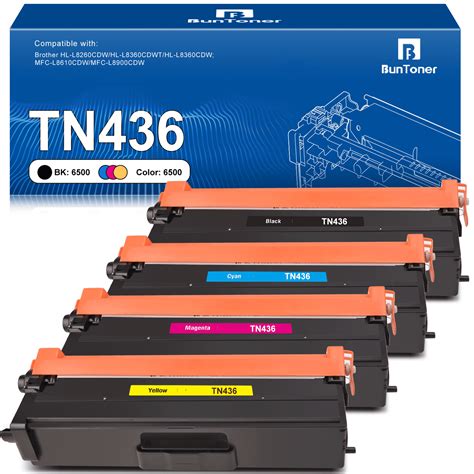
Note: Prices mentioned are subject to change without notice.
TN431 vs TN433 vs TN436 vs TN439
The main difference between TN431 and TN433 is page yield. The TN431 is a standard yield (~3,000 black and ~1,800 color pages), while the TN433 is a high yield (~4,500 black and ~4,000 color pages.
- TN436 vs TN439: The main differences are page yield and printer compatibility. The TN436 yields approximately 6,500 pages, while the TN439 yields approximately 9,000.
- DR-431CL vs DR-433CL: The Brother DR-431CL drum unit works with toners like the TN431, TN433, TN436, and TN437. The DR-433CL is used with the TN439 toners. Your printer will display a âReplace Drumâ message.
No, Brother TN433 and TN436 toner cartridges are not interchangeable in all printers. While some printers that use the TN433 can also use the TN436, there are models that are only compatible with the TN433.
The Brother TN436 toner cartridges is a reliable and cost-effective solution for high-volume printing, designed to delivery consistent, professional-quality results.
For all your printing needs, trust LD Productsâweâre the ink and toner experts. With over 25 years of experience and a massive inventory of 10,000+ products, weâre dedicated to delivering affordable high-quality printing solutions. Explore our selection today and find compatible printer cartridges to keep your printer running smoothly.
Brother Genuine Toner
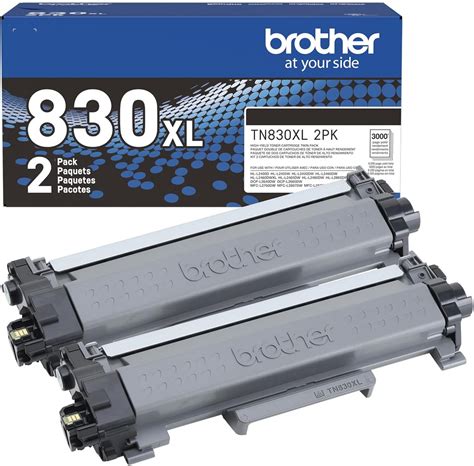
Standard Yield Toner, Black, Yields approx. Superior quality on every page. With reliable, consistent performance, Brother Genuine Toner produces premium black & white laser prints in crisp, sharp tones that wonât fade or smudge. Confident compatibility. The only toner brand recommended for Brother multi-function and all-in-one monochrome laser printers.
- This standard yield toner cartridge delivers page yields up to 1,200 pagesâ¡.
- Brother Genuine Toner is available in an extensive variety of options including a convenient multipack, as well as high-yield selections to help you handle high-volume printing with ease.
Refresh EZ Print Subscription
With Refresh EZ Print Subscription Service, youâll never worry about running out of toner again, plus youâll enjoy savings up to 50% on Brother Genuine Tonerâ¡. Get started today with a Free Trialâ¡. The following models are not eligible for the Brother Refresh EZ Print Subscription Service: HL-L2400D, HL-L2865DW and MFC-L2980DW.
Monitor toner levels from virtually anywhere. When using a printer with a wireless connection, the Brother Mobile Connect app enables you to monitor toner usage and order replacement cartridges directly from Brother, all from the convenience of your mobile deviceâ¡.
Committed to the environment. Brotherâs toner cartridge collection and recycling program encourages consumers to return their used cartridges to Brother free of charge so that they may be properly recycled and kept out of landfills. For more details, visit: www.brother-usa.com/environmentalprograms.
Developed for Brother printers. Use with Brother multi-function and all-in-one monochrome laser printers: HL-L2400D, HL-L2405W, HL-L2420DW, HL-L2460DW, HL-L2460DWXL, HL-L2465DW, HLL2467DW, HL-L2480DW, HL-L2865DW, DCP-L2640DW, DCP-L2647DW, MFC-L2760DW, MFC-L2807DW, MFC-L2820DW, MFC-L2820DWXL, MFC-L2900DW, MFC-L2900DWXL and MFC-L2980DW.
Approx. for Mono Laser Power Plan vs. eligible like standard capacity cartridges. Free app download and wireless connection required.
Brother Genuine TN630 Standard-yield Mono Laser Toner Cartridge
Standard-yield Toner, Black, Yields approx. Professional mono laser print quality you can consistently rely on for up to 1,200 pagesâ¡. Intelligently engineered to work in seamless unison with your Brother printer. Brother Genuine toner produces crisp, sharp prints that withstand the test of time.
Brother offers an environmentally responsible way for customers to dispose of Brother Genuine cartridges. Visit www.brother-usa.com/Environment to learn more.
Brother Genuine TN630 is for use with: DCP-L2520DW, DCP-L2540DW, HL-L2300D, HL-L2305W, HL-L2315DW, HL-L2320D, HL-L2340DW, HL-L2360DW, HL-L2380DW, MFC-L2680W, MFC-L2685DW, MFC-L2700DW, MFC-L2705DW, MFC-L2707DW, MFC-L2720DW, MFC-L2740DW.
Donât risk your printing to anything other than Brother Genuine toner. Brother Genuine toner is specially designed to work seamlessly with Brother printers. Rigorous and extensive testing helps to ensure a reliable printing performance.
Images are for illustrative purposes only.
tags: #brother #toner #compatibility #chart