For avid readers seeking a dedicated device that excels at displaying text, the Kobo Libra 2 emerges as a strong contender. This e-reader, released on October 19th, 2021, is an updated version of the Libra H2O that was originally released in 2019. It sits between the 6-inch Kobo Clara HD and 8-inch Kobo Sage in Kobo’s lineup, offering a balanced reading experience.
Design and Build Quality
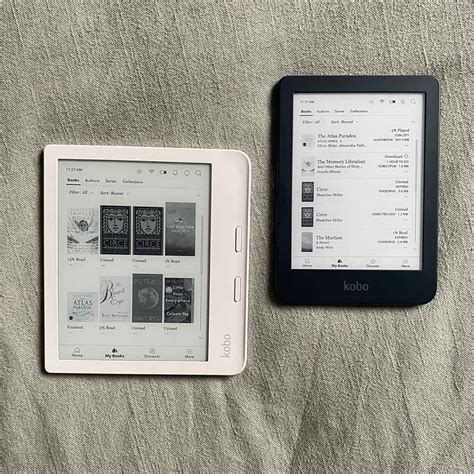
The Kobo Libra 2 is roughly the size of a Kindle Oasis and has physical page-turn buttons like the Oasis. The Oasis and Libra 2 are more or less identical in shape and size (the Libra 2 is 145 x 162 x 9 mm, or 5.7 x 6.4 x .36 inches-just different enough from the Libra H2O to break all case compatibility), but there are a few big differences.
Amazon invested in an aluminum shell for the Oasis, while the Libra and Libra 2 are both entirely plastic. This makes them feel cheaper than the Oasis, and if you squeeze your fingers on the edges of the Libra cases, you can even feel a subtle flex and even a faint squeaking sound. After months of using a Libra, I have stopped noticing it-and stopped making movements that make those sounds-but there’s no denying that Amazon’s $300 reader has a more premium feel.
They did change the design slightly by adding more of a flair to the edge and moving the buttons closer to it. The plastic casing doesn’t feel as nice as the soft rubbery texture on the Kobo Sage, and it doesn’t have the premium feel like the Kindle Oasis. It has more of a utilitarian design, and it has an indented screen instead of a flush screen, which some people consider a downgrade, but it actually helps make the screen look better without having an extra layer over the front.
Unfortunately, the Kobo Libra 2 still has a recessed screen, meaning dust and hair can collect around the edges of the bezel. That’s a negative, but it makes it easy to find the edge of the display to slide your finger up and down to adjust brightness without fiddling with a more complex user interface.
Read also: Kobo Libra Colour: Australian Release
Display and Frontlight
The Kobo Libra 2 uses a new Carta 1200 screen with improved contrast. It’s not a huge difference but it’s definitely noticeable. The contrast improvement is more noticeable on the Libra 2 with the indented screen. Blacks are darker and it helps make the text stand out more.
The other advantage the Oasis has over the Libra 2 is related to the display. While the two devices use the same E Ink display and both are well lit, with optional color-temperature variation to create a warmer tone, the Libra’s display is recessed, with a bezel that’s a bit above the screen itself. That means dust and hair and other junk can end up sticking around the edges of the display.
Frontlights can vary from one device to the next so it’s hard to make any kind of definitive statement, but the frontlight on my Kobo Libra 2 is the best frontlight I’ve seen on a Kobo ereader. It has no obvious bright spots or shadow cones, and no gradient. Both the warm and cool colors are very evenly-lit, and the frontlight helps make the text stand out. I really like how the frontlight makes the background color blend in with the white casing on the Libra 2.
Software and Features
Try These Great Tips and Tricks for Your Kobo!! / Best Kobo Libra 2 Hacks
For the most part the software on the Kobo Libra remains the same as before. With the exception of the notebook app and Dropbox support on the Kobo Elipsa and Kobo Sage, all of Kobo’s ereaders basically run the same software and offer the same features. To use the audiobook player, you need to connect Bluetooth headphones or speakers because the Libra 2 doesn’t have speakers.
With this round of updates, Kobo has matched them. You can connect Bluetooth audio devices to a Kobo reader and play back audiobooks. And most importantly, all of them use USB-C for power and data connections, rather than the old “standard” of micro USB.
Read also: Color E-Readers Compared: Kobo Libra Colour and Kindle Colorsoft
Beyond compatibility, though, the Kobo experience is remarkably similar to the Kindle. You can buy books on Kobo’s store, either on the device or on the web. The prices are the same as those found on the Kindle Store. Of course, Kindles have access to Amazon services like Kindle Unlimited.
On the other hand, Kobos are much better citizens when it comes to borrowing e-books from your local public library.
Kobo Libra 2 vs. Alternatives
Let's compare the Kobo Libra 2 with some of its competitors:
| Feature | Kobo Libra 2 | Kindle Oasis | Kindle Paperwhite |
|---|---|---|---|
| Screen Size | 7 inches | 7 inches | 6.8 inches |
| Page-Turn Buttons | Yes | Yes | No |
| Flush Screen | No (recessed) | Yes | Yes |
| Waterproof | Yes | Yes | Yes |
| Audiobook Support | Yes (via Bluetooth) | Yes (via Bluetooth) | Yes (via Bluetooth) |
| Premium Feel | No (plastic casing) | Yes (aluminum shell) | No (plastic casing) |
Final Thoughts
E-reader hardware is a pretty sleepy tech category that a lot of people don’t care about. But I love reading books on an E Ink device and won’t ever give it up. Fortunately, as sleepy as this category might be, it still manages to generate a handful of new, competitive devices every year. These new e-readers all have their advantages. If you appreciate articles like this one, support us by becoming a Six Colors subscriber.
Read also: Used Kobo Libra 2: A Review