For those looking to escape the Amazon Kindle ecosystem while maintaining a premium e-reading experience, the Kobo Libra 2 presents a compelling option. Many readers seek alternatives that offer enhanced freedom, improved privacy, and support for open formats. Despite being phased out after the release of the Kobo Libra Colour, the Libra 2 remains a competitive device.
The Kobo Libra 2 was released in late October 2021, offering several significant enhancements over the original Libra. Key selling points include doubled storage and the ability to purchase and listen to audiobooks from the Kobo bookstore via wireless headphones or external speakers.
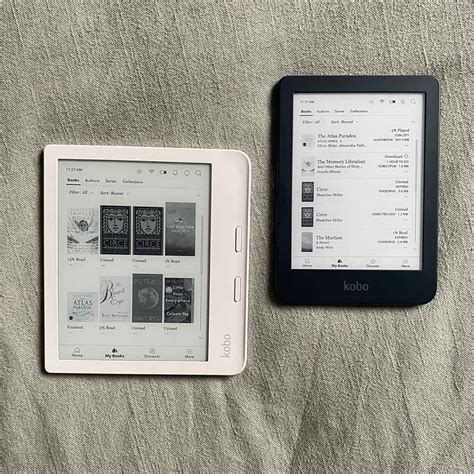
Key Features and Benefits
Here's a closer look at what makes the Kobo Libra 2 a notable e-reader:
- E Ink Carta 1200 Display: The Libra 2 features a 7-inch E Ink Carta 1200 display with a resolution of 1264x1680 and 300 PPI. This technology delivers a 20% increase in response time and a 15% improvement in contrast ratio compared to E Ink Carta 1000.
- Storage and Performance: Under the hood, it has a 1 GHz single-core processor, 512 MB of RAM, and 32 GB of internal storage.
- Audiobook Support: Users can purchase audiobooks from the Kobo bookstore and listen via wireless headphones or an external speaker. Kobo launched an audiobook subscription service in 2017, costing $9.99 per month in the US, which includes one credit a month redeemable for any audiobook title.
- Waterproof Design: With an IPX8 rating, the device can be submerged in fresh water for up to 60 minutes at a depth of 2 meters.
- Sideloading Support: Kobo supports sideloaded content, allowing users to load ebooks in EPUB, EPUB3, PDF, FlePUB, MOBI, CBR, and CBZ formats.
- Customization: The Kobo Libra 2 supports 12 fonts and 50 different font sizes, with advanced options to customize the reading experience further.
Design and Build Quality
Other reviews may suggest that the Kobo Libra 2 feels cheap, but many users disagree. The device is lightweight, making it comfortable for extended reading sessions, especially when lying down. The physical page-turn buttons offer a tactile feel, enhancing the reading experience. These buttons, combined with the lightweight design, make it easy to hold and operate with one hand.
Software and Usability
When opening the Libra 2, users can create an account or log in with an existing one to access the Kobo bookstore. The store features both ebooks and audiobooks, curated by real humans. The Libra 2 also supports Overdrive, allowing users to borrow ebooks from local libraries by entering their library card number.
Read also: Libra 2 E-Reader Review
Calibre is an excellent tool for organizing ebooks and PDFs, allowing users to convert files, download metadata, and manage their ebook library efficiently.
Addressing Syncing Issues with Overdrive
Some users have reported issues syncing the Kobo Libra 2 with Overdrive. Here's a step-by-step guide to resolve these problems:
- Install the Rakuten Kobo app on your phone and set up a Kobo account if you don't already have one.
- On your Kobo Libra 2, enter your payment details, even if you don't plan to make a purchase.
- Log out of your Kobo e-reader and log back in again.
- Re-enter your Wi-Fi password and go through the setup guide again.
- After logging back in, enter your library details in the Overdrive tab.
By following these steps, you should be able to borrow books from your local library via Overdrive on your Kobo Libra 2.
Pros and Cons
Here’s a summary of what users love and don’t love about the Kobo Libra 2:
What Users Love:
- Reduced eye strain compared to reading on phones or tablets.
- The "My Words" feature for saving and learning new words.
- Integration with Calibre for library management.
- Long battery life.
- Adjustable page rotation.
- Physical page turn buttons.
What Users Don't Love:
- Syncing issues with Overdrive.
- The refresh rate may feel slow compared to modern phones.
- The page turn animation may not be aesthetically pleasing.
- The device may attract fingerprints.
- Occasional freezing or black-out issues.
Kobo Libra Colour vs. Kobo Libra 2
When Kobo released the Libra Colour, they phased out the Libra 2. Here’s a comparison of the two devices:
Read also: Kobo Libra Colour: Australian Release
| Feature | Kobo Libra 2 | Kobo Libra Colour |
|---|---|---|
| Screen Type | E Ink Carta 1200 | Color E Ink |
| Screen Quality | Excellent clarity and contrast | Warmer color temperature, worse contrast |
| Stylus Support | No | Yes |
| Cloud Syncing | No | Yes (Dropbox and Google Drive) |
| Price | Lower (discontinued) | Higher |
While the Libra Colour introduces a color E Ink screen and stylus support, it also has a warmer color temperature and worse contrast compared to the Libra 2. The Libra Colour also supports Dropbox and Google Drive for cloud syncing.
Kobo Libra Color vs Libra 2 Review: The Ultimate E-Reader Face-Off.
Despite its age, the Kobo Libra 2 remains a strong contender in the e-reader market. Its excellent screen clarity, waterproof design, and support for open formats make it a worthwhile choice for avid readers looking to escape the Amazon ecosystem.
Read also: Color E-Readers Compared: Kobo Libra Colour and Kindle Colorsoft