Looking for a convenient way to print documents and photos directly from your iPad? Look no further than our selection of wireless printers designed specifically for iPads. These innovative devices allow you to effortlessly print wirelessly, eliminating the need for cables and complicated setups. With their seamless compatibility and user-friendly features, iPad wireless printers make printing on-the-go easier than ever before. Whether you need to print important documents for work or capture memorable moments with friends and family, our range of wireless printers will ensure you can do so with utmost convenience and efficiency.
Investing in the best printer for iPad elevates the possibilities of your design or documenting tool, it is a favorite of hobbyists and professionals alike. If you’re looking to pair your tablet with a suitable printer, we’ve compiled a list of compatible printers across a range of different needs. As mentioned, AirPrint is now compatible with thousands of top printers, so compatibility is less of a question for our top picks as overall quality.
When selecting a printer for your iPad, consider the following criteria:
- Personal vs. Commercial Use: Determine if the printer is for personal use or for a small business.
- Workflow: Evaluate whether you need a low, medium, or high workflow printer.
- Technology: Decide between laser and inkjet printers. Laser printers are generally preferred for text-based documents, while inkjet printers excel in photo printing.
- Functionality: Determine if you need copy, scan, and fax capabilities.
- Connectivity: Wireless connectivity is a plus, but Ethernet is also acceptable.
- Software: Consider whether you prefer a printer that works directly from the Print Command on your Mac and does NOT require that you install the printer's software.
- Color vs. B&W: Decide if you need color printing or if simple B&W is sufficient.
Key Features to Consider
Here are some key features to consider when choosing a printer for your iPad:
- AirPrint Compatibility: Ensure the printer supports Apple's AirPrint technology for seamless wireless printing.
- Print Quality: Consider the print resolution and color depth, especially if you plan to print photos or graphics.
- Print Speed: Check the print speed (pages per minute) to ensure it meets your workflow needs.
- Paper Handling: Look for features like automatic duplex printing, a large paper tray, and an auto document feeder.
- Connectivity Options: Ensure the printer has the necessary connectivity options, such as Wi-Fi, Ethernet, and USB.
- Ink/Toner Efficiency: Consider the cost per print and the availability of high-yield ink or toner cartridges.
Printer Buying Guide! Ink vs. Laser / Tank vs. Subscription and More!
Recommended Printers for iPad
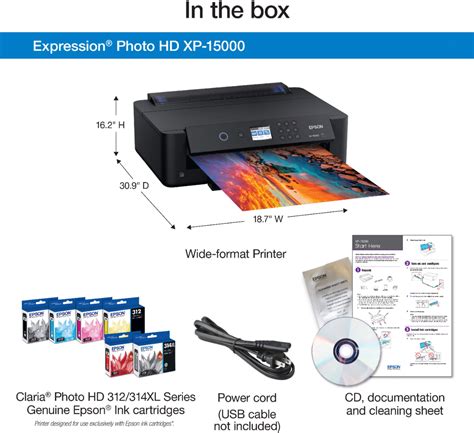
Epson XP-15000
It’s Epson’s wide-format AirPrint printer, the XP-15000, that takes the top spot as our best printer for iPad! This printer nearly snagged the top spot in our rankings of the best printers for graphic design, this six-cartridge printer is capable of stunning color reproduction for photos and designs. It comes with a specialist media tray for cardstock or other unique materials, for when your needs surpass standard documents. That said, the XP-15000 is quite a slow printer - at 9 pages per minute - which may make it unsuited to all uses. The ultimate solution in home or office printing for iPad, the Epson XP-15000 may be a little slower than we would like, but it’s tremendously high-quality.
Read also: TN221 & TN225 Toner Cartridge Information
Canon MAXIFY GX4020
Designed for home offices and small businesses, the Canon MAXIFY GX4020 delivers high-quality, low-cost printing, and outstanding wireless connectivity in a compact size. Get serious print productivity with a high page yield of up to 6,000 Black / 14,000 Color pages per full ink bottle set and a low cost per print of less than 2 cents per page. The MAXIFY GX4020 comes with a full set of ink and a 3-year or 80,000 pages limited warranty so you can print with confidence. The MAXIFY GX4020 is easy to set up and maintain and offers great media versatility to print on a variety of media types and sizes, including business cards, envelopes, banners and more. Produce crisp, colorful documents quickly and cost-effectively with fast print speeds and a high quality 4-color pigment-based ink system. Keep printing with a large combined plain paper capacity of up to 350 sheets. Easily connect and print through high-speed USB, Ethernet, or wirelessly from computers or mobile devices. This model is backed by Canon's Service and Support network.
Canon imageCLASS MF753Cdw
We made mention of the Canon imageCLASS MF753Cdw as our best color laser printer, and with iPad compatibility included as standard, it makes for a sterling iPad print solution as well. In contrast to the XP-15000, the MF753Cdw can print at speeds of up to 35 pages per minute, with high-yield toner that can provide as many as 4,000 prints per month. It comes with three input trays: a 250-sheet primary input, a 50-sheet tray for specialist media, and an optional 550-sheet tray as a backup - but that’s not all. As an all-in-one printer, scanner and copier, the price for this model is more than justified for home use. That said, this unit may not be ideal for those working in a limited space, as the MF753Cdw is quite the cumbersome printer - difficult to move and difficult to store.
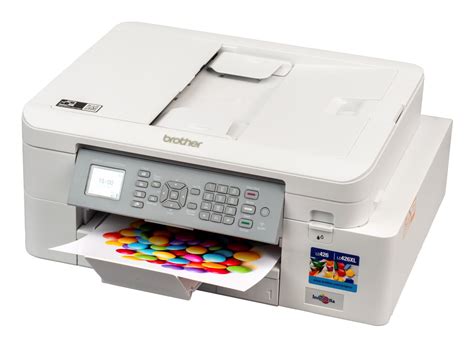
Brother MFC-J4335DW
Brother printers are among our favorites on the market, and the Brother MFC-J4335DW continues the streak with a highly affordable, Apple-compatible printer for all your needs! The MFC-J4335DW is fully compatible with AirPrint, but that’s not all: if you have a smart speaker set up in your home, you can even control this printer with your voice - making for an even more versatile print solution. Brother’s trademark affordability makes its appearance, with a low cost-per-print and high-yield ink cartridges thanks to the Ink Tank system employed in this unit. Despite the printer’s high-resolution prints, however, we found the overall photo quality lacking: with underwhelming color depth and finer details.
HP OfficeJet 9025
If you are looking for an office printer for iPad, consider the HP OfficeJet 9025. With two 250-page trays and auto-document feeding, the OfficeJet 9025 makes for highly productive printing and scanning. The HP printer isn’t built for printing photos, but still manages to create high-quality borderless photos if the need arises. That said, if you want to check the print settings on the device itself, you may struggle, as the small display makes it difficult to parse.
Epson EcoTank ET-2800
The perfect medley between versatility and affordability, the Epson EcoTank ET-2800 is one of our favorite printers. Though the ET-2850 is newer, the ET-2800 is still worth the cost. The Ink Tanks make for stellar print results, whether it’s reams of documentation of specialist art prints. With wireless connectivity - and AirPrint, of course - you have the freedom to print from a variety of Apple-compatible sources with ease. But equally, there’s a reason that we don’t: for specialist media, the tray is rather inconveniently located at the rear of the device, making it difficult to access.
Read also: Using Canon Printers with Chromebooks
Brother MFC-L2820DW
Best for small offices, the Brother MFC-L2820DW Wireless Compact Black & White (Monochrome) All-in-One Laser Printer is an affordable choice for high-volume printing, copying, scanning, and faxing. With print speeds up to 34 ISO pages per minute (ppm) and automatic duplex printing, it quickly produces crisp, easy-to-read black & white prints. Versatile paper handling features like its 250-sheet paper tray and 50-page auto document feeder reduce the number of manual tasks in your day. The integrated 2.7” touchscreen makes navigation simple and allows you to print-from and scan-to popular cloud-based apps. Flexible connection options include dual-band wireless, Ethernet, and USB 2.0 interfaces. Advanced security features provide peace of mind as they help safeguard your information and maintain secure connections while printing. An efficient, time-saving addition to any workspace, this affordable wireless printer combines four critical business functions into one compact footprint.
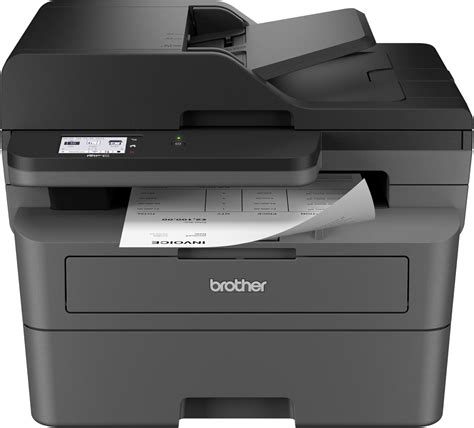
Brother HL-L2405W
Best for homes and home offices, the Brother HL-L2405W Wireless Compact Black & White (Monochrome) Laser Printer is the sensible, time-saving choice for connected printing. Simple and affordable, this reliable printer consistently produces crisp, easy-to-read black & white prints and offers print speeds up to 30 ISO pages per minute (ppm). The 250-sheet paper tray reduces the frequency of paper refills, helping to save you more time in the workday. You can connect this dependable printer to multiple devices using built-in dual-band wireless or connect locally to a single device with the USB 2.0 interface. Safeguard your information and maintain secure connections while printing with advanced security features. Efficient, durable, and cost-effective, this wireless printer is a time-saving addition to any home workspace.
Brother HL-L3280CDW
Great for shared workspaces and working from home, the Brother HL-L3280CDW wireless digital color printer is engineered to facilitate efficiencies that simplify every workday. Space-saving, capable, and trustworthy, this high-volume printer creates laser-quality, smudge-free documents that position you for success. Steady, flexible connection options and consistent performance means it is ready to get to work whenever you need it. Achieves timesaving print speeds up to 27 ISO pages per minute (ppm) and features an easy to use 2.7” touchscreen, dual-band wireless connectivity and mobile device compatibility. For peace of mind while printing, you can rely on its advanced security features to safeguard sensitive data. Engineered and supported by Brother, the HL-L3280CDW is a natural fit in any small, bustling workspace.
AirPrint and Wireless Connectivity
Apple’s AirPrint technology is their primary means of sending media to printers. AirPrint enables you to print directly from your iPad without the need for additional drivers or software. Most modern printers support AirPrint, making it easy to print documents, photos, and more.
Do I need WiFi for AirPrint? Though most printers require connection to a wireless network for efficient AirPrint results, some offer a version of WiFi Direct that enables the user to connect directly to the printer without going through a WiFi network.
Read also: Key Features of HP 83A Toner
Can AirPrint print photos? Yes: You can print photos using AirPrint if you have a compatible printer. Simply share the photo as you would normally, then click the “Print” option. If you’re on the same network as the printer, it should give you the option to send your image.
Troubleshooting AirPrint Issues
If you encounter issues with AirPrint, consider the following troubleshooting steps:
- Ensure the printer has the latest firmware.
- Check for unreliable Wi-Fi connections, which may cause haphazard printing.
Additional Considerations
Depending on your requirements, you may require a faster printer - especially in high-pressure business environments such as offices or other businesses. Though most documents don’t need highly detailed prints, it’s certainly important for images or graphics of any kind.On the subject of specialist media, depending on your print requirements, having some specialist media compatibility is essential - printers are capable of creating a wide range of products, even edible ink in some cases.Though having more varied print options is always welcome, it’s not always necessary.
tags: #printers #compatible #with #ipad