Although iOS 12 was discontinued long ago, this article is quite useful for anyone who is running or who wants to run iOS 12 on a compatible iPhone, iPod touch, or iPad. Apple first previewed iOS 12 on June 4, 2018. iOS 12 is the twelfth major release of the iOS mobile operating system developed by Apple. Aesthetically similar to its predecessor, iOS 11, it focuses more on performance than on new features, quality improvements and security updates.
Announced at the company's Worldwide Developers Conference on June 4, 2018, iOS 12 was released to the public on September 17, 2018. It was succeeded for the iPhone and iPod Touch by iOS 13 on September 19, 2019, and for the iPad by iPadOS 13 on September 24, 2019. Security updates for iOS 12 continued for four years after the releases of iOS 13 and iPadOS 13 for devices unable to run the newer versions.
Although the company declared it to be the "most advanced mobile operating system," Apple otherwise was a bit more humble in its promo for iOS 12 than it has been for several earlier versions of the iOS. iOS 12 includes numerous tweaks, improvements, and new features. iOS 12 changes the way iOS users see the world using AR, makes communications fun and expressive with Memoji and Group FaceTime, and with Screen Time, helps customers understand and take control of the time they spend interacting with their iOS devices.
Here's a breakdown of what iOS 12 brought to the table:
- Speed improvements: iOS 12 is designed to be faster than iOS 11, allowing apps to open more quickly even on older devices.
- Photos: Many people take lots of photos with their phones or tablets, and it can sometimes be challenging to sift through all of them to find the best ones. iOS 12 uses artificial intelligence to do much of this work for you, and it will then show you the photos it thinks you might want to share. It also allows you to search for photos based on specific words or categories.
- New Siri features: Several new features were added to Siri, the built-in virtual assistant, to make it more useful. The new Shortcuts feature allows Siri to be used with many third-party apps. With the Suggestions feature, Siri can learn your routines and suggest useful reminders.
- Screen Time: Spending too much time on your phone or tablet can be unhealthy. The Screen Time feature is designed to help you monitor how much time you are spending on your device, including how much time you spend in each app. It also lets you set time limits for apps and block inappropriate content, which is especially helpful if your kids use devices.
- New augmented reality (AR) features: iOS 12 improves on the augmented reality features of iOS 11, allowing you to take accurate measurements of objects with your device's camera, play multi-player games, and more.
- Group FaceTime: FaceTime now allows you to make video calls to groups (up to 32 people at once).
Although it may not get as much attention as new features, promised speed improvements of 50%-70% with basic tasks like launching the camera, loading the keyboard, and more responsive typing, are welcomed by all.
Read also: Will My iPhone Work with iOS 26?
Screen Time is a new feature in iOS 12 that records the amount of time a user spent on the device. Screen Time also provides blocking features to limit usage of apps (with time limits) or set other restrictions such as on purchases or explicit content. It replaces Restrictions in the iOS Settings app, but can also be used by adults to limit their own usage. These features can be used with or without a passcode.
A dedicated application in iOS 12 allows users to set up Shortcuts, automated actions that the user can ask Siri to perform. Using the Shortcuts app, a user can create a phrase and type in the action they want Siri to do for them. Once they tell the phrase to Siri, Siri will automatically do the task they set for it in the Shortcuts app.
How to Use Siri Shortcuts on iOS 12 - The basics | Step by Step
Messages in iOS 12 introduces a new type of customizable Animoji called "Memoji" which allows a user to create a 3D character of themselves.
Anyone with a compatible iPhone, iPad, or iPod Touch can upgrade to iOS 12. If you buy a new iOS device after iOS 12 is released, it will come pre-installed. While it's not required, it's a good idea to upgrade your device to iOS 12 if possible.
Control Center is separated from the app switcher on iPad and can be opened with a swipe down on the top right corner. Since iPhone XS, iPhone XR and iOS 12, iPhone verifies hardware components on every boot time; if a non-Apple screen and/or non-Apple battery is found, iOS will display “non-genuine screen” and/or “non-genuine battery” prompt on iOS settings, and the battery health information is unavailable.
Read also: 1151 to 1200 Cooler Adapters
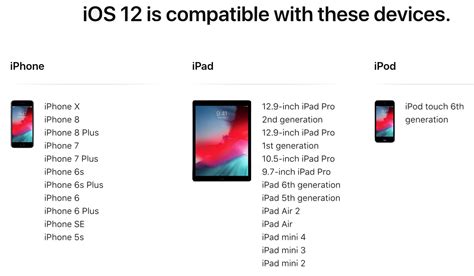
Which devices are compatible with iOS 12?
Unlike iOS 11 before it, which did drop support for some devices, iOS 12 supports the same iOS devices as its predecessor. Specifically, iOS 12 supports the "iPhone 5s and later, all iPad Air and iPad Pro models, iPad 5th generation, iPad 6th generation, iPad mini 2 and later and iPod touch 6th generation" models. However, not all features are supported by all devices.
| Device Type | Models |
|---|---|
| iPhone | iPhone 5s and later |
| iPad | All iPad Air and iPad Pro models, iPad 5th generation, iPad 6th generation, iPad mini 2 and later |
| iPod touch | iPod touch 6th generation |
If you are not certain which iPhone, iPad, or iPad touch you have, most models can be identified externally by Model Number precisely enough to determine whether or not it is supported by iOS 12. * These devices do not have an external Model Number.
For example, in the United States, this "Model" within the iOS looks like MQ7R2LL/A, which specifically refers to an iPhone 8 (AT&T/A1905) in Silver with 256 GB of storage sold on AT&T. Everyi.com's Ultimate iLookup feature can identify these devices by order numbers from around the world and by device Serial Numbers, too.
iOS 12.1, released on October 30, 2018, adds the ability to include up to 32 people in a FaceTime conversation. This feature is only supported with video by devices with the Apple A8X or Apple A9 chip or later; it is only supported for audio on iPhone 5s, iPhone 6, and iPhone 6 Plus, and is not available at all on iPad Mini 2, iPad Mini 3, and iPad Air (1st generation). Group FaceTime was disabled on January 28, 2019, due to a software bug that allowed calls to be answered by the caller rather than the recipient, allowing video and audio to be transmitted unless the call was declined. The functionality got restored on February 7, 2019, with the release of iOS 12.1.4.
Apple Maps had started to be rebuilt from the ground up by relying on first-party map data instead of using map data provided by third parties.
Read also: Sagittarius Relationships
Upgrading to iOS 12
As always, when iOS 12 was released, it was wise to wait for a "bug fix" update or two before upgrading, but iOS 12 quickly became more stable and the performance improvement is readily apparent. Accordingly, there is little reason not to upgrade a compatible device to iOS 12 from an earlier version of the iOS. iOS 12's improvements in time management, privacy, and security also should be welcomed by just about everyone, too.
You'll still be able to download most apps even if you don't have iOS 12. For apps you already have installed on your device, it's possible that future updates will only be compatible with iOS 12. Yes. Any app you previously had installed on your phone will still be there once you upgrade to iOS 12. Almost all apps installed on iOS 11 should still work in iOS 12. However, if you're upgrading from iOS 10 or earlier, you may have some 32-bit apps that are not compatible with iOS 11 or 12. If an app isn't compatible, you may be able to find a similar app to replace it.
tags: #ios #12 #device #compatibility