When Amazon released the first Kindle in 2007, it kickstarted an entirely new way to read your black and white books. Using e-ink, which relies on tiny pixels made up of real ink droplets, Kindles display content like novels, putting much less strain on your eyes than traditional backlit screens, and with lower battery draw to boot. But until recently, technology limitations meant color content hadn’t gotten the same treatment. Now, with the release of the Kindle Colorsoft, Amazon’s first color e-reader, color e-ink is finally in the mainstream. Colour e-readers aren’t just a novelty anymore. In 2025, they’ve finally become mainstream, with sharper displays and features that go beyond reading plain text.
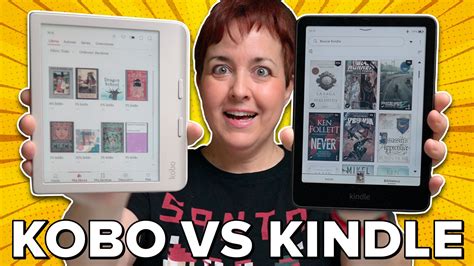
The time has come for a comparison review between the Kindle Colorsoft and the Kobo Libra Colour. Both offer colour E Ink screens and are designed to make everything from novels to comics to travel guides look more alive. Both readers sit in the 7-inch range, Kindle Colorsoft at 7.1 inches, and Kobo Libra Colour at 7 inches flat. At a glance, they seem similar. But side by side, there are some differences. Here’s where the experience starts to differ. Kindle is tied to Amazon’s bookstore, which is massive.
This article provides a comprehensive comparison of the Kindle Colorsoft and the Kobo Libra Colour, focusing on their specifications, image quality, additional features, content library, and price. It aims to help readers make an informed decision based on their individual needs and preferences.
Raw Specs and Physical Attributes
Raw specs are a bit of an unusual topic when it comes to e-readers. You’re not necessarily browsing the internet or using productivity apps on these devices, and so topics like processor speed or memory capacity don’t matter as much as they do on, say, a laptop. While slow computing can hamper these devices, typically, any lag you’re going to encounter has more to do with the limitations of e-ink than anything else. But there are still considerations to take into account here.
Factors like screen size and resolution matter, as do battery life, lighting, and weight. For the most part, the Kindle Colorsoft and the Kobo Libra Colour have almost the exact same capabilities, with some minor differences worth noting. Being a reader in 2025 does not necessarily imply standing still. Both of these devices are constructed for a mobile world and are thin, lightweight and portable. They can fit right in on a train, at the airport or simply when killing time in a cafe.
Read also: Color E-Readers Compared: Kobo Libra Colour and Kindle Colorsoft
For some, breaks between reading might include a quick scroll or even checking out casual games. While neither e-reader supports browsing or apps like tablets do, they work well alongside other digital habits. Bluetooth makes switching to audiobooks easy, especially when walking or doing chores.
Display and Lighting
Both e-readers use the same 7-inch E Ink Kaleido 3 display, which has a 300 ppi resolution when looking at black-and-white content, a 150 ppi resolution when looking at color content, and can display 4,096 colors overall. For instance, the Kindle gets a little brighter than the Kobo, measuring in at 395 nits for me vs. the Kobo’s 382 nits, although the bigger difference is in color temperature. Speaking subjectively, the Kobo felt as if it always had a yellowish tint, even with the color temperature set to 0, whereas the Kindle more easily emulated a white page with color temperature set to 0. This isn’t noticeable with the lighting turned off, and both are adequately warm with the color temperature set to max. It’s likely just a quirk of the lights each manufacturer chose, but worth taking into account if you’re sensitive to that sort of thing.
Similarly, the Kindle Colorsoft has a light sensor that allows for automatic brightness adjustment. Both brightness and color temperature can also be put on a schedule on the Kindle, but on the Kobo Libra Colour, scheduling is the only automation available. Any other changes to lighting or temperature will need to be made manually.
Weight and Battery Life
For weight, the Kobo Libra Colour is slightly lighter at 199g versus 217g for the Colorsoft, although both are still more lightweight than the typical paperback novel (based on a few I pulled off my shelf). Battery life is also similarly rated at a little over a month for each, and while that mostly rang true over my time with each device, your situation will differ based on how bright you set your screen and how frequently you enable wifi.
Design and Build
When it comes to build, each device is roughly the same thickness, but the Kindle is a little taller while the Kobo is a little wider. That’s because the former places its grip on the bottom of the device while the latter has it to the right. Kobo’s screen has a touch more contrast and warmth in the colours, which helps with graphic novels or detailed charts. Comfort-wise, Kobo has a handle on ergonomics. It retains its slightly curved grip and surface page-turning buttons, which make it easier to use with one hand. Both come with adjustable front lights and colour temperature controls, making nighttime reading easier on the eyes.
Read also: Reading on Kindle
Image Quality
Despite having the same specs on paper, not to mention the same screen, image quality is less of a toss-up than you’d think. Both use the same base display, yes, but Amazon also says it’s supplemented the Kaleido with a special oxide backplane for sharper contrast and a light guide to help keep light rays from bleeding into areas where they’re not wanted. Are these changes actually noticeable, or are they marketing speak? To my surprise, yeah, they make a pretty big difference. Amazon must’ve done a little something extra to make colors appear darker and more colorful. Ghosting (afterimage effects) is also less of an issue on the Kindle’s screen.
In testing with both older and newer comic books, the Kindle Colorsoft regularly displayed color content with more accuracy and fewer washed-out colors. In particular, shading was more consistent on the Colorsoft, whereas the same details were often either splotchy or lost entirely on the Kobo. This also extended to black and white content.
I should note that the Kobo does have a “Reduce Rainbow Effect” setting that’s supposed to combat this, but in practice, I found it made images so blurry and performance so laggy (both effects Kobo warns may happen when enabling it) that I preferred to leave it turned off. The Kindle has no such option, but even comparing the Kobo with rainbow effect reduction turned on to the Kindle, I still preferred the latter. The Kindle does ship with two color modes that allows you to control how vivid colors are.
Additional Features
That’s two categories down for the Colorsoft, including the seemingly all-important image quality category. But here’s the trick: having a bit better image quality on a color e-reader might not be the be-all, end-all, depending on your preferences. With only a few thousand colors available, you’re already making a compromise here versus reading on an LCD or a physical copy. Beyond that, marginal improvements to the way content is displayed will really only matter to you based on how sensitive you are to minutiae like inconsistent shading. And the Kobo Libra Colour offers a few bonuses that the Kindle Colorsoft doesn’t.
While both e-readers have bluetooth connectivity for audiobooks, that’s about it when it comes to alternate ways to use the Kindle Colorsoft. Otherwise, it’s just a nondescript tablet, with page turns activated via touchscreen, even if the color screen does allow for color-coded highlighting.
Read also: Libra 2 E-Reader Review
The Kobo Libra Colour, meanwhile, has two big additions that make it feel a bit more premium than the Kindle at first blush: page turn buttons and stylus support. The Libra Colour has some hardware advantages with the addition of page buttons and stylus support. It also has a rotation sensor, and the power button is located on the back and it’s recessed so it’s hard to accidentally press.
The former is pretty self explanatory, and how much it matters to you depends on the type of reader you are. Personally, I don’t mind losing page turn buttons, but I do acknowledge that some of my friends would die for them, and it’s a bit of a shame that despite the Colorsoft being Amazon’s second most expensive Kindle, it doesn’t have them. Their presence on the Kobo does make it feel more premium in comparison.
Also helping on that front is the stylus. It’s a $70 add-on, but it allows you to jot notes right onto your books, as well as make your own notebooks, complete with text conversion and multiple available highlighter and pen colors. The responsiveness isn’t quite as good as on a more traditional tablet, but I found it worked well enough for shorthand and basic doodles, so I could see the feature being of use to students. It’s also a much cheaper way to get a digital notebook than Amazon’s $400 Kindle Scribe or any of its similarly priced competitors from the likes of Boox, Supernote, and reMarkable.
Are either page turn buttons or stylus support necessarily system sellers? I wouldn’t say so. But they certainly do help the Kobo Libra Colour stand out, which is more than I can say for the Colorsoft. For note-takers, Kobo has added stylus support.
Kobo Libra Colour vs Kindle Colorsoft Comparison Review
Content Library
To me, access to content is a problem for almost all color e-readers, but there’s still a clear winner here. Starting with the good-both devices have access to large content stores for traditional books, with the Kobo sending users to Rakuten’s digital bookstore and the Kindle using Amazon’s. Kindle leans into Amazon’s services, keeping things tight and seamless. Finding a title that is not available is uncommon.
You can find pretty much any novel or non-fiction book you’d like on either, and if you’re keen on a subscription, both devices have plans that offer access to select titles for free. Both devices also let you sideload your own content, so you can continue to port EPUBs or PDFs to your new e-reader. However, the Kobo has the advantage of supporting comic formats (CBR and CBZ) natively, so sideloading comics is going to be a lot easier on the Libra Colour.
But here’s the rub-comics availability on both is hit-or-miss, and usually requires you to buy each individual comic you want piecemeal. That can get expensive quick, much more so than using apps like Marvel Unlimited or DC Infinite, and could leave you with a gap in your reading if you discover when partway through a series that it crosses over with a title you can’t get. While both devices suffer from this, I find it’s still worth bringing up, as comics make up the majority of the color content I read. This is the biggest warning I would make to anyone considering a color e-reader that can't run apps.
Still, despite both devices having similar flaws, there is one place where the Kobo pulls ahead. Recently, Amazon changed its policies to make it impossible to download and export your Kindle library to other apps or devices without breaking its rules. There are still ways to do it, but it’s possible the tech giant will shut them down with future updates. Long story short, Amazon is trying to make it so that buying content on its stores locks you into using its devices and apps, whereas Rakuten actually has official guides for accessing your purchases wherever you want. The advantage of Kobo is its openness. It supports a larger number of formats, such as EPUB, PDF and CBZ, and it does not bind the user to one source. Public libraries? Covered, thanks to built-in OverDrive.
That relative openness is a big part of the Libra Colour's appeal, and while you won’t notice it if you only ever buy content through each device’s respective primary storefront, it presents a great peace-of-mind to Kobo owners if they ever want to swap ecosystems in the future.
Price
This one’s pretty self explanatory. Despite having the same basic specs as the Kobo Libra Colour, a more locked down storefront, and no bonuses like page turn buttons or stylus support, the basic Kindle Colorsoft is $50 more expensive, at $280 versus $230. Even the recently released 16GB version, which halves the storage, is still more expensive, at $250. You’ll really need to value native access to your Kindle library or that improved contrast and lessened rainbow effect to justify the price-especially because the Kobo Libra Colour has an even cheaper sibling, the Kobo Clara Colour, that offers a similar experience but with a 6-inch screen, no page turn buttons, and no stylus support. The price tags are close, but not quite the same. Kindle Colorsoft retails at around US$280, while Kobo Libra Colour comes in at about US$230.
Summary Table: Kindle Colorsoft vs. Kobo Libra Colour
| Feature | Kindle Colorsoft | Kobo Libra Colour |
|---|---|---|
| Display | 7-inch E Ink Kaleido 3 (300 ppi B/W, 150 ppi Color) | 7-inch E Ink Kaleido 3 (300 ppi B/W, 150 ppi Color) |
| Brightness | 395 nits | 382 nits |
| Storage | 16GB or 32GB | 32GB |
| Page Turn Buttons | No | Yes |
| Stylus Support | No | Yes (Stylus sold separately) |
| Waterproof | IPX8 | IPX8 |
| Content Access | Amazon Kindle Store | Rakuten Kobo Store |
| Price (USD) | $250 (16GB), $280 (32GB) | $230 |
Final Thoughts
Choosing a winner here was a little difficult. The Kobo Libra Colour takes one more category than the Colorsoft in the above writeup, sure, but the Kindle is also flatly better when it comes to key metrics like lighting and image quality.
That said, it’s not so much better, to my eye, that it makes the Libra Colour irrelevant. Right now, color e-ink is a compromise no matter which device you’re using, and with that in mind, the Kobo’s improvements elsewhere start to look a bit more attractive.
For one, it’s significantly cheaper, while still giving the same basic experience. That’s especially key here, because given color e-ink’s current limitations, unless you’re already familiar with it, I'd suggest it’s probably better to start cheaper and see if it appeals to you rather than go all out with your first purchase. And while the display and lighting fall a little bit behind, the rest of the hardware does give you more for your buck, with page turn buttons and stylus support.
But most important to me is the more open library. Buying content using the Kindle store essentially locks your library to Amazon devices, which means that if you upgrade, you’re going to have a hard time swapping out down the line. Yes, you can port content from other stores to your Kindle, but it’s much less convenient than using Rakuten’s store and just knowing that Rakuten will explicitly support you moving content to other ecosystems in the future. Overall, I like the design of the Kobo better with the page buttons on the side and the power button out of the way, but I think the screen and the frontlight look better on the Kindle (minus the yellow band).
All of that comes together to make the Kobo Libra Colour an easier recommendation for me. But that doesn’t necessarily make it the best color e-reader. The Kobo has a big advantage being able to use a stylus if you want to take notes, provided they don’t disappear when turning pages. For someone already tied into Amazon’s services or who relies on Audible, the Kindle offers more integration. Both e-readers bring something solid to the table. Kindle Colorsoft is smooth, reliable and designed to work perfectly within Amazon’s world.
Is Kindle Colorsoft worth it? Mostly, I would say no, the Kindle Colorsoft is not worth it. It has the best color I've ever seen on an e-reader, but the locked down ecosystem and high price make it hard to justify, especially because it is worse at displaying black-and-white content than the Kindle Paperwhite, and the Amazon store isn't a great way to access color content like comic books.
Is the Kobo Libra Colour worth it? If you're interested in color e-readers, I would say the Kobo Libra Colour is a better place to start than the Kindle Colorsoft. It's still not great at reading black-and-white content, but it's cheaper, and its more open library means its easier to read books you might already own on it, or bring any books you bought on the Libra Colour to another device later on. It's worth the slight hit to fidelity over the Kindle Colorsoft, and it's not the only non-Kindle e-reader worth considering.
Is Kindle Colorsoft better than Paperwhite? The Kindle Paperwhite is still the better choice for most people. That's because it's cheaper, and is better at displaying black-and-white content like novels. If you're an adult and you're not into comic books, it's probably the best choice for you. And even if you are into comic books, those are easier to access on iOS or Android. Just because an e-reader has color doesn't make it the best option, even if you can afford it.